
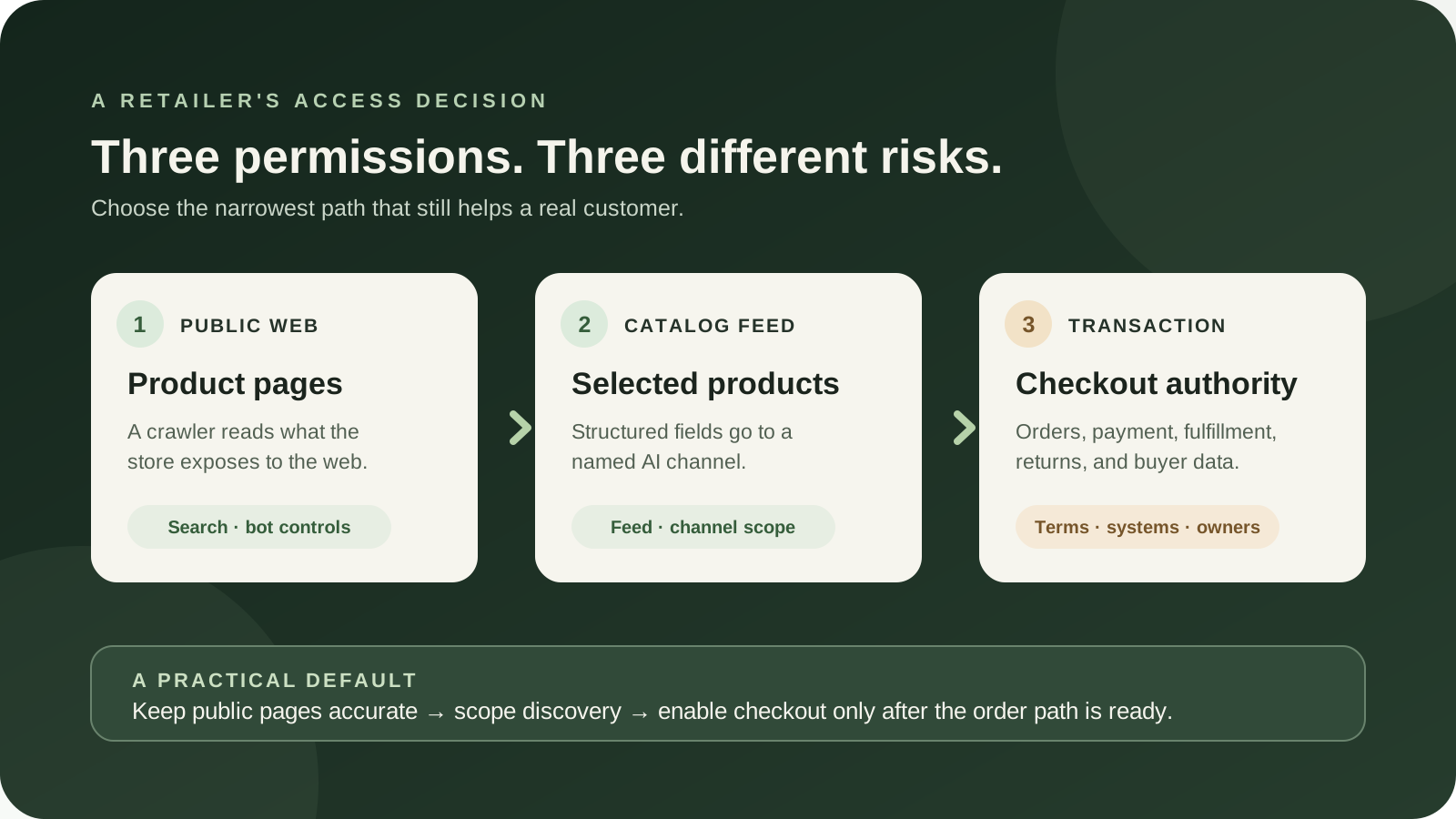
You do not have to make one giant choice called “AI access.” A shopping agent visiting a store page, an AI channel receiving a structured product catalog, and a customer completing an order inside an AI interface are three different things. They expose different data, create different obligations, and deserve separate decisions.
For most retailers, the sensible starting point is staged: keep ordinary product pages accurate and available to customers; inspect what each product feed or storefront channel shares; allow discovery only where the channel, terms, and catalog fit; and leave direct checkout off until the business can reconcile orders, inventory, returns, taxes, customer data, and attribution. If a product is private, contract-restricted, unsafe to recommend without context, or priced differently for authenticated buyers, do not treat a public AI catalog as harmless marketing.
There are three permissions, not one AI switch
Retail teams often hear “AI shopping” and imagine a robot independently browsing the whole store, reading customer records, and placing orders. In practice, a customer may encounter a product through several routes. Keeping those routes separate is the first useful design decision.
| Permission | What it means | Typical control | Question to ask |
|---|---|---|---|
| Public-page access | A crawler or browser agent reads pages already reachable on the open web. | Authentication, bot controls, rate limits, and sometimes advisory crawler rules. | Would I publish this page and its claims to an ordinary visitor? |
| Catalog access | A commerce platform or merchant sends structured product data to a named AI channel. | Sales-channel, product-feed, or platform settings. | Are these exact products, prices, images, and availability appropriate for this channel? |
| Checkout authority | A buyer can finish the purchase in an AI surface, or an agent can act through a checkout flow. | Channel-specific checkout settings, checkout integrations, and transaction rules. | Can we fulfill, support, refund, and attribute this order without a new operational blind spot? |
These permissions can move independently. A retailer may leave product pages available to search engines while withholding a catalog feed from one AI channel. It may share a catalog for discovery but send the shopper to its own checkout. It may enable in-channel checkout for a small group of simple, stocked items but not for custom, restricted, or wholesale products.
That layered approach is more useful than choosing between “block AI” and “open everything.” It gives merchandising, security, legal, ecommerce, and customer support a concrete object to review: a specific channel, a specific set of products, and a specific transaction path.
What is changing in 2026—and what is not universal yet
The current shift is not that every assistant can buy anything from every store. The shift is that several platforms are building distinct ways to represent a catalog, refer a shopper, or support an in-channel transaction. Their availability and controls differ, and a vendor announcement is not proof that a particular retailer is eligible today.
Shopify’s current help pages describe Agentic Storefronts for eligible stores. Shopify says products can be made available through Shopify Catalog or other sales channels, and that the store owner can manage channels in the Shopify admin. Its documentation distinguishes ChatGPT as a discovery-focused referrer, where the buyer finishes on the store’s checkout, from channels that may support direct checkout when the feature is active and available to that store. The same documentation says availability can be rolling out, so an operator should verify the actual setting in the account rather than infer it from a news post.
OpenAI’s Agentic Commerce Protocol documents describe product feeds for discovery and a separate checkout integration. The developer documentation says feed onboarding and Instant Checkout participation in ChatGPT are currently limited to approved partners. A protocol document tells an engineering team how a supported integration works; it does not mean any merchant can turn it on today.
Google’s Universal Commerce Protocol is presented as an open standard for commerce actions in AI Mode and Gemini. Google’s merchant guide currently offers a waitlist and describes an embedded checkout path for specific approved merchants. That is a meaningful direction for integration planning, but it is not a universal self-serve checkout switch. Meta’s September 2026 Muse announcement describes a personal agent that can browse, fill forms, and complete purchases with user approval. That is a company announcement about a particular product, not evidence that every retailer has accepted that agent or that every browser-based agent is authorized.
Keep those statements in their proper categories. Platform documentation can establish what the platform says its feature does. It cannot establish your account’s eligibility, the exact terms you accepted, the resulting sales lift, or how well the integration behaves with your catalog. Those are account-specific questions.
How a product reaches an AI answer
Think of the path as four doors, each with a different owner.
- The open web: the product page, policy page, and store information are publicly reachable. Search crawlers and browser agents may find them through links, search results, or a sitemap.
- Structured product data: a platform feed carries fields such as product title, description, options, image, price, and availability. The receiving service can process those fields more consistently than it can infer them from a page.
- Discovery and referral: an AI surface displays a product or sends a shopper to the merchant. It may report a click, session, or sale differently from the store’s normal analytics.
- Order and payment: a checkout session collects buyer and fulfillment details and asks the merchant or its payment provider to validate and process a transaction. This is where inventory, tax, fraud, shipping, refunds, and customer support become operational facts.
There can also be an authenticated account or API connection, which is a different level of access from a public page. Do not let a discussion of a product feed quietly turn into permission for an agent to use a customer login, account history, saved payment method, or wholesale portal. Those are separate systems and separate authorizations.
The diagram summarizes the distinction. It is not a single escalation ladder that every business must climb. A store can remain at public pages, choose a limited catalog feed, or decline a transaction integration entirely.
A channel map for a retailer deciding today
Here is a cautious reading of the live platform documentation as of October 19, 2026. The table is a starting point for an account review, not a substitute for checking your current plan, country, product eligibility, channel settings, and signed terms.
| Path | What the documentation says | Practical implication |
|---|---|---|
| Shopify Agentic Storefronts | Eligible stores can share products through Shopify Catalog or other channels. The documentation separates discovery/referral from direct checkout; controls and eligibility vary by channel. | Review the Agentic section in the actual admin. Check catalog access, auto-enrollment, each channel, checkout, and product eligibility independently. |
| OpenAI ACP | Structured feeds support discovery; Instant Checkout uses a separate integration. Current docs say checkout participation is limited to approved partners. | Improve the data you own first. Do not fund a custom checkout build on the assumption that partner access is open or guaranteed. |
| Google UCP | Google describes an open standard and merchant integration paths, including an embedded checkout option for specific approved merchants; its guide links to a waitlist. | Track product data and protocol fit, but treat production access as an eligibility and onboarding question, not a completed deployment. |
| Meta Muse | Meta announced a personal agent that can browse and purchase with user approval, using its stated payment and security approach. | Read the current product and merchant terms. A consumer agent’s capability does not itself grant the agent permission to access your site. |
| Other web agents | Some use ordinary browsing; others may identify themselves or connect through a platform feed. Their identity and behavior are not interchangeable. | Use authenticated controls for protected areas. Treat crawler labels as one signal, not proof that an agent is authorized. |
One detail matters for timing: platform settings can change after a help page or a vendor launch. Shopify’s current admin documentation, for example, describes controls for catalog access and direct checkout and says removal of Catalog access can take up to seven days to complete. If you are changing a setting because a product or contract is sensitive, record the effective date, confirm the channel’s response, and do not assume that clicking Save instantly erases data already delivered or copied elsewhere.
Discovery is not checkout, and checkout is not a recommendation guarantee
A catalog feed can make a product easier for a system to interpret. It does not guarantee that the product will appear for a shopper’s question, that a model will describe it correctly, that the shopper will trust the result, or that a sale will follow. Platform vendors describe potential reach and better representation; those are vendor claims about the design, not an independent forecast for your store.
Discovery-only access has a clear advantage: the shopper can learn that the product exists, while your own store remains the place where the offer, checkout, shipping details, and post-purchase help are presented. This preserves more of your existing funnel and may keep the customer’s visit, cart, and support context on systems your team already knows.
It also has tradeoffs. A referred shopper may not carry the exact AI conversation into your site. Attribution can be incomplete. The assistant may display a short description without the full caveats a salesperson would give. If variants, compatibility, or availability are ambiguous, a customer can arrive with the wrong expectation.
Direct checkout can shorten the distance between product selection and payment. The additional convenience is not free operationally. Your systems still need to give an authoritative answer on price, stock, shipping, tax, discount eligibility, and order acceptance. The support team needs to know where the order came from. The returns process needs to identify which policies were shown. Finance needs to reconcile processor records and fees. An AI interface can make the purchase feel simple to the buyer while making the underlying exception path harder for your staff.
So use a plain rule: product discovery can be tested with a limited catalog and a clear data boundary; transaction access needs a separate business case and a separate readiness review. Do not infer transaction consent from a catalog opt-in.
Start with the catalog you can stand behind
Before enabling a new channel, pick ten representative products and compare every important field in the source system, public product page, feed preview, and channel listing. Include an ordinary best seller, a product with variants, a product that regularly goes out of stock, a bundle, a sale item, and anything that has a compatibility or safety caveat.
Check that the title identifies the item a person actually receives. A warehouse nickname or internal SKU alone is rarely a helpful consumer title. Check that the description says what is included and what is not. If a replacement filter fits only one machine generation, do not rely on a support agent to explain that after an AI has surfaced it as a generic filter.
Check variants as separate purchasable choices. Color, size, voltage, capacity, quantity, material, model year, and region can change the product itself. If the feed groups variants incorrectly, a system might display an image of one option beside the price of another. Your source system may be technically accurate while the mapping is not.
Check price and availability at the cadence that your business can maintain. A stale feed can show a sale price after the promotion ends, or show an item as available after the last unit has been reserved. For made-to-order or backordered products, define what “available” means in plain language. A checkout integration should validate the current state rather than treat an earlier product card as authoritative.
Then inspect attributes that often disappear in short listings: shipping limits, installation requirements, return windows, warranty terms, age or licensing restrictions, compatibility, required accessories, subscriptions, and whether a price applies only to a logged-in buyer. Decide which facts belong in a structured field and which demand a human explanation before purchase.
Use the channel’s preview or feed diagnostics when available, but treat them as a directional check. A preview is not the exact presentation every customer will see, and a listing-quality score is not proof of sales performance. Your baseline should include actual product errors, returns, cancellations, and support contacts—not only impressions or listing completeness.
B2B and wholesale sellers need a stronger boundary
Business sellers have a special reason to review the feed before they celebrate discovery. Wholesale price, contract price, volume break, negotiated terms, region-specific inventory, and account eligibility may be more sensitive than the product description itself.
Shopify’s current documentation says its agentic storefronts support direct-to-consumer selling and that products it can identify as B2B-only are excluded. It also warns that custom themes or third-party apps may manage access in ways the platform cannot recognize. A product sold to both D2C and B2B audiences may appear with the public D2C price rather than a negotiated business price.
This is a useful platform-specific rule, not a general guarantee for every ecommerce stack. If your B2B restriction is implemented as a visual price hide, a custom script, or a theme rule, the underlying data may still be public or may still flow into a feed. The browser can hide a number from a visitor without making that number private in the underlying system.
Make the boundary server-side. Separate public and private catalogs where possible. Require authentication before returning account-specific price or availability. Use an access-controlled API for quote-only items. Keep contract pricing out of public product fields and feed exports. Test with a logged-out session and inspect the HTML, structured data, sitemaps, product feed, and agent channel preview. Ask the platform vendor exactly how it classifies your B2B catalog and what happens when one SKU is shared across business and consumer channels.
For a distributor, the right first pilot might be a short, public list of standard products with transparent retail pricing—not the full ERP catalog. Keep account lookup, negotiated pricing, minimum order quantity, credit terms, and quote approval inside the authenticated workflow. If a buyer needs a human to determine whether a part fits an installed system, the product feed should say that clearly and route to a qualified person instead of encouraging a blind purchase.
If your business uses a separate wholesale storefront, use the separation deliberately. Do not assume that an agent can honor a customer-specific assortment because it can see a public product page. An agent should receive only the access its identity and the customer’s authorization permit. The BishopTech guide to AI agent identity and delegated access explains why a shared login is not a safe substitute for scoped identity.
Review privacy, commercial terms, and who owns the exception
Catalog access and checkout can expose different categories of information. A product feed may contain public product attributes, images, prices, and availability. A completed order may involve the buyer’s name, contact details, shipping address, selected items, and other fulfillment information. An agent may not have access to your whole customer database, but it can still handle personal data for the particular order it helps complete.
Read the terms for the specific channel. Look for what data is sent, how it is used, whether the provider can change the feature, whether the channel receives an order fee, what attribution is available, which return and support responsibilities remain with you, and how you leave the program. If a fee is waived during a launch period, put the end date and post-promotion rate on a calendar. Do not repeat an old forum post about a percentage as if it were the current contract for every account.
Also decide who inside your company owns a bad outcome. If the AI presents the wrong product, who corrects the listing? If an in-channel order exceeds available stock, who contacts the buyer? If a buyer misunderstands a compatibility note, who pays for shipping or handles an exception? If a platform changes a default, who notices? “The platform handles it” is not a support procedure.
OpenAI’s current checkout documentation describes the merchant validating the order, fulfillment options, tax, payment risk, and order acceptance on the merchant’s own systems. That is important: even when the checkout appears inside an AI interface, the merchant’s systems may remain the operational authority. A familiar visual surface does not eliminate your responsibility to reconcile the underlying transaction and service it.
Keep a brief approval record: channel, product scope, data categories, terms reviewed, checkout mode, owner, test date, known limitations, and stop condition. This is not paperwork for its own sake. It makes a later audit possible when a product manager says “we switched AI on” but no one can say which channel or which permission changed.
Robots.txt is a request, not a lock
A robots.txt rule can tell a cooperative crawler not to fetch a path. It does not authenticate the visitor, prevent every agent from requesting the page, or revoke a product feed a commerce platform has already shared. Shopify explicitly describes robots.txt rules as advisory and says that blocking open-web crawlers does not stop data supplied through an active Catalog channel.
Use the right control for the path you want to govern:
- Private information: require real authentication and enforce authorization on the server. Do not send private prices or customer data to a public page and hope a crawler behaves.
- Catalog syndication: use the platform’s channel and feed controls. Confirm whether an off switch affects one channel, all channels, or only future updates.
- Automated browser traffic: use bot-management or rate-limit controls where you operate the edge. A provider such as Cloudflare documents separate policies for search, real-time agents, and training crawlers, but the available controls depend on your plan and configuration.
- Commercial permission: review platform terms and site terms with counsel when the product, content, or contract requires it. A technical block is not a substitute for a rights or contract review.
Blocking an agent can also block helpful crawlers or legitimate customers if the rule is broad. Cloudflare’s current documentation distinguishes Search, Agent, and Training categories rather than treating all AI-related traffic as one bucket. That is a useful mental model: a system that fetches a public page to answer a shopper is not necessarily doing the same job as a crawler collecting training data. Check the rule’s current effect, whether it detects verified and unverified bots, and how your site responds to false positives.
If the business has decided to deny a category of automated traffic, confirm the enforcement in logs or a test request from a controlled environment. Publishing a rule is not proof it works. Conversely, a quiet log is not proof that no one is accessing a product through another channel or feed.
Choose a lane by product risk and operating maturity
The best starting lane depends less on the company’s size than on the product and exception rate. A large distributor with clean product identifiers and a stable order API may be ready for a narrow transaction test. A small specialty retailer with confusing variants and handmade stock may be better off cleaning its catalog before sharing it.
| Situation | Reasonable starting lane | What must be true first | Hold back |
|---|---|---|---|
| Standard consumer items, stable stock, clear returns | Selected-channel discovery; consider a small direct-checkout pilot later. | Feed matches the store, fulfillment is predictable, and attribution is visible. | All-SKU enrollment without an owner or stop rule. |
| Custom, fit-sensitive, or compatibility-heavy products | Discovery with the store’s own product page as the destination. | Critical exclusions and fit questions appear before purchase. | In-channel checkout that strips configuration or consultation steps. |
| B2B, wholesale, or negotiated pricing | Public discovery only for explicitly public items; keep pricing and account actions behind login. | Server-side access control and verified separation between public and customer-specific data. | Catalog exports that include contract fields or invite unauthenticated ordering. |
| Regulated, age-restricted, or contract-restricted products | Wait or block until the channel’s eligibility and controls are documented. | Legal, compliance, and product owners have approved the exact path. | Assuming the agent will honor a warning or age notice on a product page. |
| New store with weak tracking or inconsistent fulfillment | Fix the product data and order process first. | Baseline orders, cancellations, returns, and source attribution are usable. | Buying custom protocol work before the normal checkout is reliable. |
“Wait” is a real decision, not a failure to keep up. It can mean waiting for a channel to become available, for the provider to clarify fees, for your platform to expose a needed control, or for your team to fix inventory synchronization. While you wait, you can improve product data and make the public buying path easier to understand. Those improvements still help customers arriving from ordinary search, email, ads, referrals, and sales conversations.
A 30-day test that can answer a business question
If the channel is available and the product is a safe fit, run a test small enough that a bad result is manageable and specific enough to teach you something. Do not call “we were enabled for a month” an experiment. Before the start, write the decision the test will change.
Days 1–5: establish the baseline and the boundary
Pick a product family and a control group of similar items that remain in the usual channel mix. Record current sessions, product-page conversion, order value, cancellations, returns, support contacts, and inventory errors for a comparable period. If the data is too sparse for a statistical conclusion, say so now. The point is to avoid telling a story from a dashboard after the fact.
Write down which fields and products the channel receives, which checkout mode is active, where order details travel, which team owns exceptions, and what it costs to participate. Save the settings and terms you reviewed. Exclude products with contract, privacy, safety, or pricing questions that are not resolved.
Days 6–10: audit the feed before exposing the products
Compare the test items across your product system, web pages, feed export, and channel preview. Fix title, variant, image, price, inventory, compatibility, shipping, and returns mismatches. Ask someone who does not know the product family to interpret the listing. If they cannot tell which item fits, an agent may not rescue the description.
Test the public page at a logged-out browser session and inspect whether any supposedly private field is present in page source or structured metadata. Confirm that account-specific prices and wholesale rules are served only after authentication. If you cannot prove that boundary, remove those items from the test.
Days 11–24: enable one discovery path
Choose one channel, a limited product group, and discovery-only where that is possible. Leave direct checkout disabled unless checkout itself is the question you are prepared to test. Check the listing at the beginning and on a schedule. Confirm price and stock on a sample of products, not only the most visible one.
Use channel reporting, tagged links where supported, analytics, order records, and a simple post-purchase “How did you find us?” question. These signals will not always reconcile perfectly. Keep them separate and document the gaps instead of adding them together as if they were unique buyers. The guide to measuring early AI channel tests covers the same evidence problem from the paid-discovery side.
Days 25–30: make a keep, narrow, or stop decision
Review what changed against the baseline: qualified sessions, orders, revenue after fees, cancellation and return rates, support load, accuracy, and customer feedback. For a low-volume store, one order can be interesting without proving a repeatable result. Look for operational surprises as carefully as sales.
Keep the channel only if the observed benefit is worth the cost and the data boundary stayed intact. Narrow it if some products work and others create confusion. Stop if the platform sends inaccurate data, the economics do not fit, or the team cannot support the exception path. Record what would have to change for a future retest. Do not upgrade to checkout because discovery produced a few clicks; that is a different permission and a different experiment.
Should you buy a connector, build an integration, or wait?
Start with the commerce platform’s native controls when they meet the need. A native feed and a per-channel setting are usually easier to audit than a custom intermediary, assuming the platform gives you the product and transaction controls your business requires.
Buy a connector when it solves a defined gap: one catalog needs consistent mapping to several channels, product data is held across systems, or the current integration cannot safely keep price and inventory fresh. Before signing, ask which fields are copied, how often changes propagate, how deletions work, whether B2B segments are preserved, how errors are surfaced, and what happens when you cancel.
Build a direct integration only when an approved channel and a real operational requirement justify it. A protocol can make integration more standardized; it does not remove authentication, idempotency, inventory reservations, tax, payment, fraud, fulfillment, refunds, monitoring, or customer support. If your normal checkout has an unresolved double-order bug, an AI channel will magnify the problem rather than solve it.
Wait when the only business case is fear of missing out. Wait when no one can state the channel’s total cost, when checkout is invite-only, when the product feed is unreliable, or when sensitive pricing is not separated. Waiting is especially reasonable for products where a wrong selection is costly and a human fit check is part of the value.
If you are building a broader agent workflow around commerce data, keep the capability narrow and observable. The agent identity guide helps distinguish an agent’s identity from the customer’s authorization, while the B2B AI governance guide covers ownership, inventory, and controls for systems already in use.
What sellers are asking—and what those conversations can prove
Public merchant conversations show that the control question is not hypothetical. In a Shopify Community thread opened in April 2026, sellers objected to confusing enrollment and to the possibility that hiding products could also remove them from ordinary search or the storefront. A later participant reported getting one store’s channel removed through support. That is an account-specific report, not proof of a universal opt-out process.
A Reddit discussion in the Shopify community, with an update in September, shows how easily “AI access” gets confused with “direct checkout.” Sellers asked whether a channel was enabled, whether they could turn it off, and whether catalog discovery meant an order would happen inside the AI. The current Shopify documentation now separates those controls more explicitly. The conversation is evidence of confusion at a point in time, not a reliable description of today’s settings.
A separate discussion in r/PPC responded to a reported dispute over a personal shopping agent accessing a large marketplace. The comments turned quickly to platform rules, advertising, attribution, customer relationships, and who controls checkout. Reddit cannot confirm the underlying platform event, but it does surface the operator’s actual tradeoff: an agent may create a new route to a shopper while weakening the retailer’s control over the shopping context.
These threads are useful because they reveal questions people are trying to resolve. They do not establish how many retailers share the concern, how much demand exists, or what commercial result a channel will produce. That is why the recommendation here is a small, measurable decision—not a claim that every store should opt in or every store should block agents.
A preflight checklist for the person who owns the store
- List every path that can expose products: public page, feed, sales channel, marketplace, API, and authenticated portal.
- For each AI channel, record whether it receives product data, sends a referral, supports direct checkout, or does more than one of those.
- Review the channel’s current terms, eligibility, pricing, data handling, default behavior, and removal timeline.
- Check product-level eligibility, variants, sale price, stock, shipping region, compatibility, returns, and restricted items.
- Test public pages and structured data while logged out. Confirm that wholesale and account-specific information is actually protected server-side.
- Set a clear owner for listing errors, order exceptions, refunds, customer questions, and reporting.
- Write down one outcome and one stop condition before enabling a pilot.
- Review the actual account after each platform update. A setting name or feature may change after this article is published.
If you want help mapping product data, access boundaries, and an AI commerce pilot to the systems you already use, start with a focused consultation. The useful first deliverable is a channel-and-data map with explicit owners—not an automatic checkout deployment.
Frequently asked questions
Can I allow AI to discover products but keep checkout on my own site?
Often, yes, depending on the platform and channel. Shopify’s current documentation describes a Catalog-only setting for some channels, where the AI can help shoppers find products and then send them to the store checkout. Other channels may have different controls or may still be rolling out. Verify the exact setting in your account before making the assumption.
Does blocking an AI crawler remove my products from AI shopping results?
Not necessarily. A crawler rule affects cooperative access to the open web. It does not necessarily revoke structured data already shared through a commerce platform, remove a product from another channel’s feed, or erase a copy that has already been delivered. Use feed and channel controls for feed access, and authentication for genuinely private information.
Will turning off a product feed make my store invisible to AI?
No. Public product pages may still be found through ordinary search and web crawling. Shopify’s documentation says that disabling Catalog access can leave open-web discovery available, and its current settings page says Catalog removal may take up to seven days. Read the exact channel instructions and do not promise immediate invisibility.
Is direct checkout safer because the platform uses a payment token?
Tokenization can reduce exposure of payment credentials in a specific flow, but it does not by itself prove that the product, order, address, refund, or fulfillment path is safe for your business. Review the payment provider’s design and the merchant’s responsibilities, then test the full lifecycle, including declines, cancellations, returns, and support.
Can an AI shopping channel leak my B2B prices?
It depends on how the catalog and access rules are implemented. A platform may exclude products it recognizes as B2B-only, but custom theme logic or third-party access controls may not be recognized. Test what is sent in the feed and keep negotiated prices behind server-side authentication. Do not rely only on a hidden price field in the page.
Should a retailer build an ACP or UCP integration now?
Only if the channel is available to your business and you have a concrete need that native tools do not meet. Open standards can reduce integration friction, but they still require reliable catalog data, order validation, current inventory, payment, tax, monitoring, returns, and a support owner. If participation is partner-gated or on a waitlist, prepare the data and revisit access later.
Sources and further reading
Platform documentation below describes the providers’ current stated behavior and may change. The seller discussions are included only as qualitative examples of questions raised in public—not as representative surveys or verified policy.
- Shopify Help: Shopify agentic storefronts — channel overview and discovery-versus-checkout distinctions.
- Shopify Help: Catalog and product discovery — product fields, crawlers, robots.txt, product hiding, and B2B considerations.
- Shopify Help: Managing agentic storefronts — current admin controls, auto-enrollment, channel settings, and the stated delay for Catalog removal.
- Shopify Help: Data sharing and privacy — product and order information shared through channels.
- OpenAI Developers: Get started with Agentic Commerce — product-feed onboarding and current partner access.
- OpenAI Developers: Agentic Commerce Protocol key concepts — checkout partner eligibility, merchant validation, payment, and order responsibility.
- Google for Developers: Universal Commerce Protocol — current merchant onboarding, waitlist, and checkout integration options.
- Cloudflare Docs: Block AI Bots — documented distinctions among search, agent, and training behavior and available policy controls.
- Meta Newsroom: Introducing Muse — Meta’s September 2026 description of its consumer agent and purchase flow.
- Shopify Community: Not allowed to opt out — a merchant discussion beginning April 4, 2026, including a later account-specific support outcome.
- Reddit r/shopify: “Agentic Storefronts — I thought we could opt out?” — a March 2026 discussion with a September update about channel and checkout confusion.
- Reddit r/PPC: discussion of agent access and retailer control — a September 2026 operator discussion; not an authoritative source for the reported platform event.