
The first sign of shadow AI is rarely a dramatic security incident. It is usually a small surprise. An employee has a paid chatbot account nobody approved. A developer has connected a personal API key to a script that runs every night. A sales team is using an agent to summarize calls, but nobody knows where the transcripts are stored. A finance workflow is quietly making thousands of model calls, and the first person to notice is the person opening the bill.
Then somebody asks the question that makes the room uncomfortable: How much AI are we actually running?
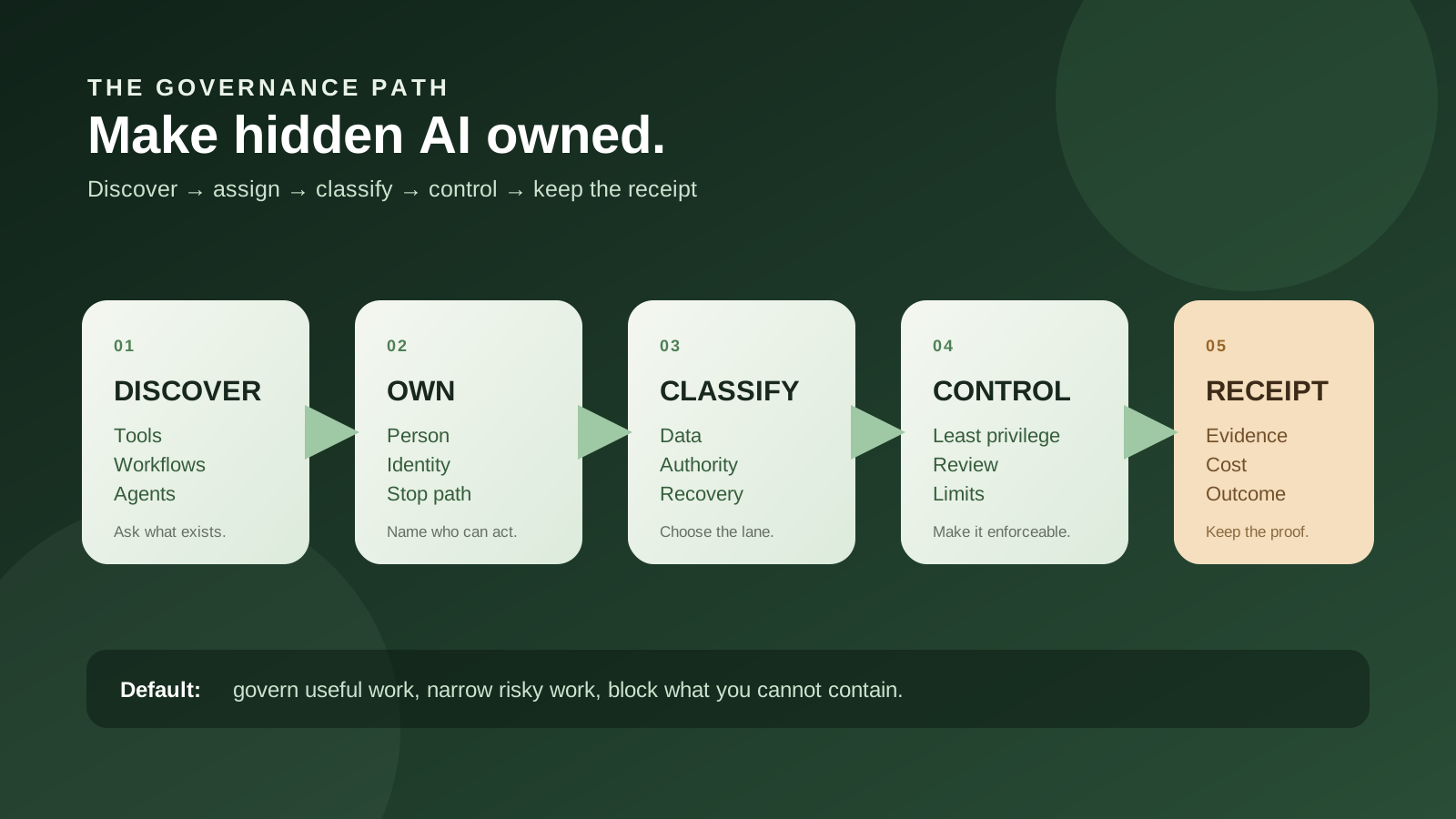
My practical answer is this: do not begin with a blanket ban, and do not begin by buying a giant governance platform. Begin with a short, honest inventory. Give every useful system an owner. Record what data it sees, which identity it uses, what it can change, what it costs, and how you would stop it. Keep low-risk work moving inside clear lanes. Block or shut down the things that touch sensitive data, money, access, customers, or production without a boundary you can defend.
That sounds less exciting than announcing an enterprise AI policy. It is much more useful. Governance is not a document that says people must be careful. Governance is the operating habit that lets a company answer, in plain English, what an AI system is doing, who owns it, what it can reach, and what happens when it fails.
The short answer: visibility before permission
Shadow AI is not a particular brand. It is AI operating outside the controls your organization can see and enforce. Microsoft describes two common forms: employees adopting unsanctioned tools and teams deploying unmanaged agents that were never registered, owned, or brought under policy. The common problem is not whether the tool is good or bad. It is that the business cannot account for it.
That definition matters because companies often argue about the wrong object. They debate whether ChatGPT, Claude, an open model, an AI coding tool, or an automation platform should be allowed. The more useful questions are:
- What job is the system doing?
- Whose data enters it?
- Which account, service identity, or personal credential does it use?
- Can it only produce a draft, or can it send, publish, spend, delete, or change access?
- Who can turn it off?
- What evidence remains after it runs?
An employee using a public chatbot to rewrite a public job posting is not the same risk as an agent reading customer contracts and writing changes into a billing system. The product names may be identical. The governance decision should not be.
This is also why a policy alone does not solve shadow AI. A policy can state what is allowed. It does not tell you what is already running, whether the policy is being followed, or whether the approved path is usable enough that people will choose it. A policy without visibility is a wish. Visibility without ownership is a spreadsheet that slowly turns into folklore. Ownership without controls is an accountable person holding an empty fire extinguisher.
Shadow AI is a visibility problem before it is a model problem
It is tempting to treat employee-built AI as a discipline issue. Someone used a tool without asking, so the answer is to prohibit the tool. That approach can be appropriate for a truly unacceptable data path, but it is a poor first response to ordinary experimentation.
People use unapproved tools for predictable reasons. The approved option is too slow. Nobody knows where to request access. The team needs a feature IT has not evaluated yet. A developer can solve an annoying task in an afternoon and does not want a six-week procurement conversation. A manager sees a useful result and tells the employee to keep going. The company gets a working workflow before it gets a record of the workflow.
Public practitioner discussions show this friction in unusually direct language. In one sysadmin thread, a poster described developers using four or more AI development tools in parallel for months and worrying about secrets and proprietary information. The question was not simply “how do I block this?” It was “I do not think there is much point in trying to kill it, but what do I do?” That is a governance question. It asks for a response that changes behavior without pretending the capability can be wished away.
A small-business thread makes the same point from the other side of the desk. The owner had found improper AI use and wanted employees to keep using AI appropriately, with guardrails. The practical suggestions in the conversation were familiar: define data that cannot be pasted into a tool, name approved tools, require review for certain outputs, make ownership clear, and escalate risky use cases. The thread is anecdotal and contains some low-quality or promotional replies, so it is not proof of how common the problem is. It is still a useful signal of the question people are trying to answer.
The inference I draw is simple: if the governed path is harder to use than the hidden path, employees will keep building around it. That does not excuse risky behavior. It tells you where the control design has to work. Discovery, approval, and safe alternatives need to be part of the same operating path.
What the current evidence actually says
The newest useful signal for smaller companies comes from Pax8's Q3 2026 SMB AI Pulse. Its October 12 release says it surveyed 1,150 business owners, executives, functional leaders, and managers involved in technology decisions at companies with 5 to 499 employees across the United States, United Kingdom, Germany, and Sweden.
Pax8 reports that 67% of AI-engaged businesses had built at least one AI solution in regular use, another 19% were prototyping, and only 13% relied exclusively on off-the-shelf tools. Among those building, the report says 52% were developing workflows connected to other business systems, 46% were building or testing multi-step agents, and 39% had created custom integrations with an AI provider's API.
Those figures are worth paying attention to, with the right caution. This is a vendor-sponsored, self-reported survey, not an independent census of every small business. The sample is limited to companies and people that qualified for the survey, and the release says some questions were asked only of businesses that use, build, or pay for AI. You should not turn the report into “every company is running an agent.” It does support a more modest claim: among the businesses already engaged with AI in this survey, building and connecting AI is common enough that governance cannot assume all use is purchased software.
The governance numbers are the sharper signal. Pax8 says 35% of AI-engaged businesses found tools, workflows, or agents operating without official approval in the previous six months. Formal documented review of internally built AI ranged from 23% in the United Kingdom to 45% in Sweden. In the United States, where the release says 81% of AI-engaged businesses had built solutions in use, 36% of builders had formal documented review and 41% relied on consistent but undocumented review.
The same release says 49% of businesses that paid for AI in the past year received at least one bill or usage charge higher than expected. It also says 55% of decision-makers spent at least three hours per week reviewing, editing, or fact-checking AI-generated work, while 7% spent ten hours or more. Those are self-reported numbers with the limitations Pax8 publishes, but they point to three different problems that often get collapsed into “AI governance”:
- Discovery: what exists and who built it?
- Economics: what does it cost when people use it at real volume?
- Trust: how much human time is required to check the work?
Fixing only one of the three will not make the program feel healthy. An inventory that ignores spend is incomplete. A cost dashboard that cannot tell you which workflow made the calls is not governance. A review queue that has no owner or stop condition just moves the hidden work onto a manager's calendar.
The four honest responses: ban, govern, buy, or build
When a company discovers shadow AI, leaders often jump between two extremes. One says, “Shut it all down.” The other says, “Everyone is using it, so we may as well let anything run.” There are at least four distinct responses, and a mature program uses more than one of them.
| Response | When it fits | What it buys you | Where it fails |
|---|---|---|---|
| Ban or block | The data path or side effect is unacceptable, or the company cannot create a safe boundary quickly enough. | A clear stop signal for a high-risk path. | People move to personal devices, new vendors, or unmonitored workarounds unless the underlying need is addressed. |
| Govern the use | The workflow is useful and can be bounded with an owner, approved data, permissions, review, and evidence. | Continued value with a smaller and more visible blast radius. | A policy becomes theater if nobody checks the inventory, limits, or owner after launch. |
| Buy a platform | Discovery, evidence, enforcement, or policy work is recurring across many teams, devices, providers, and tenants. | Shared coverage, integrations, reporting, and operational leverage. | A platform may cover one device estate or one provider while missing local tools, personal accounts, custom agents, or the real business decision. |
| Build a small control layer | The inventory and workflow set are narrow enough for your team to understand and operate. | Control over your fields, approvals, policy logic, and evidence path. | You become the product owner for discovery, connectors, retention, security, upgrades, and support. |
The default for a small or midsized B2B team is usually a combination: govern the low- and medium-risk work, block the red paths, and use a simple inventory before buying a platform. Build only the pieces that are directly connected to a real workflow or evidence problem. “We need AI governance” is too broad to buy against. “We need to know which agents can read customer contracts and who can disable them” is a requirement.
Why a blanket ban is usually a poor first move
A blanket ban is emotionally satisfying because it gives everyone a clear sentence. It can also be exactly right for a specific situation, such as an unapproved agent sending sensitive records to an external service or a personal API key attached to production credentials. But “ban AI” is not a complete control strategy.
First, the word AI covers too much. It includes an autocomplete feature in an editor, a summarizer inside a help desk, a private model running on a laptop, a workflow that classifies incoming forms, a browser extension that sees every page, and an autonomous agent with access to a payment system. The risk is shaped by data, identity, side effects, and reversibility. A brand-level ban treats unlike things as if they were identical.
Second, a ban can reduce reporting. If employees think disclosure means punishment or a forced shutdown, they have a reason to keep the useful workflow invisible. That is the opposite of the inventory NIST recommends. NIST's AI RMF Playbook says organizations should establish policies for creating and maintaining an AI system inventory, designate a responsible individual or team, and decide which systems and attributes are recorded. You cannot maintain an inventory of systems nobody feels safe admitting exist.
Third, network blocks are not the same as authority controls. A company can block a hostname and still have employees use a personal device, a different provider, a local tool, or an approved service in an unapproved way. Blocking can be a useful boundary, but it should answer a specific question: which action or data flow must stop, on which managed surface, under which exception path, and how will the company confirm that the stop worked?
Use a ban or block when one of these is true:
- The data is too sensitive for the available provider, account, region, or retention terms.
- The system can make a high-impact or irreversible change without a reliable approval or policy boundary.
- The identity and ownership are unknown, and the workflow is already touching production or external customers.
- The cost can run without a tested limit or a way to attribute usage.
- The company cannot preserve enough evidence to investigate a failure or revoke access.
In those cases, a pause is not anti-innovation. It is a clear statement that the business has not yet built a safe lane. Pair the block with a path to request a bounded alternative. Otherwise the company has only taught employees to hide the same need somewhere else.
Build the smallest AI inventory that can answer an incident question
You do not need an enterprise catalog on day one. You need a record that lets a responsible person answer five questions without interviewing the entire company:
- What is this system doing?
- Who owns it and who can stop it?
- What data and systems can it reach?
- What can happen when it succeeds or fails?
- What evidence and cost does each run leave behind?
NIST's inventory guidance is intentionally broader than a list of model names. It describes an organized database of artifacts that may include documentation, incident response plans, data dictionaries, source code links, and contact information for relevant AI actors. That is a useful way to think about the record. The inventory is not a trophy cabinet. It is the map an operator uses when a customer asks what happened or a system needs to be disabled.
| Inventory field | The question it answers | Minimum useful value |
|---|---|---|
| Name and purpose | What job does this use case perform? | A plain-English sentence, not “AI assistant.” |
| Owner and sponsor | Who is responsible for operation and business value? | A person or team, plus a backup and a stop authority. |
| Provider and identity | Which model, account, API key, service identity, or delegated user does it use? | Provider, environment, credential owner, and revocation path. Never store reusable secrets in the inventory. |
| Inputs and data class | What enters the model, tool, memory, or runtime? | Public, internal, confidential, personal, regulated, customer-owned, or unknown. |
| Outputs and destinations | Where does the result go? | Draft, internal record, customer communication, system of record, file, or external service. |
| Side effects | Can it send, publish, spend, delete, grant, or change? | Read-only, reversible write, approval-bound write, or high-impact action. |
| Review and evidence | Who checks the result and what can be reconstructed? | Review role, approval rule, run ID, logs, source references, and retention period. |
| Cost and limits | What prevents an accidental usage or labor bill? | Account, budget, rate limit, alert, and the person who responds. |
| Lifecycle | How does it change or end? | Version, last review, dependencies, known failures, and decommission or kill-switch steps. |
Do not wait for perfect metadata. A record with “owner unknown” is more useful than no record because it turns an invisible gap into a visible assignment. Set a due date for the missing field. Do not fill it with an assumption that later becomes fact.
Also keep the inventory separate from the secrets it describes. It can point to a secrets manager, an access group, a repository, or a run system. It should not become another place where API keys, customer exports, or full prompt logs accumulate.
Triage use cases by data, authority, reversibility, and evidence
Risk labels are useful only when they change what happens next. A green, yellow, or red label is not a compliance conclusion. It is a routing decision for the next control.
| Lane | Typical example | Minimum treatment | Stop or escalate when |
|---|---|---|---|
| Green: bounded assist | Rewrite public copy, summarize an approved internal meeting, classify a non-sensitive support queue. | Approved account, data boundary, basic training, owner, and a way to report a problem. | Data becomes sensitive, output becomes externally binding, or the tool begins taking actions. |
| Yellow: connected workflow | Draft replies from customer records, analyze internal sales data, create tickets, or run an agent over a shared workspace. | Named owner, least-privilege identity, source and destination record, review rule, usage limit, audit trail, and tested rollback or correction. | The owner cannot explain data retention, the action is not attributable, or a retry can duplicate an external effect. |
| Red: high-impact or unbounded | Autonomous money movement, access changes, regulated decisions, destructive production changes, or an agent with broad credentials. | Pause or isolate until a specific authorization, approval, evidence, recovery, and incident path exists. | Any required control cannot be enforced outside the model or cannot be tested before use. |
Four questions do most of the triage work:
- Data: what is the most sensitive input or output?
- Authority: what can the system cause another system or person to do?
- Reversibility: can the effect be undone without guessing which records changed?
- Evidence: can an operator reconstruct the input, version, decision, tool call, and result?
That matrix is deliberately simple. It is not an excuse to skip sector-specific legal, privacy, safety, or security review. It is a way to stop every use case from receiving the same answer. A public copy assistant and a payroll-change agent should not share a single approval rule merely because both use a language model.
The same principle applies to employee-built software. A developer may build a useful agent that reads a ticket queue. The risk rises when the agent can also read secrets, access production, change permissions, or call arbitrary external URLs. The model's intelligence does not grant it authority. Keep identity, authorization, and high-impact actions in application code and controlled services. The AI agent identity guide goes deeper on the difference between a human delegation, a service account, and an agent or task principal.
Find hidden AI without turning the company into a police state
Discovery is where governance programs can lose trust. If the first message sounds like a search for people to punish, employees will rationally hide more. If the first message sounds like an amnesty with no follow-up, the business may collect stories without creating boundaries. The useful middle is a time-boxed discovery sprint with a clear promise: disclose what exists, classify it honestly, and fix the boundary before assigning blame for ordinary experimentation.
1. Ask people to show the clever thing
Start with direct conversations. Ask each team to show the most useful AI workflow, prompt library, agent, browser extension, API script, or automation they have built or adopted. Ask what it saves, what it reads, what it writes, and what breaks. This is often faster than starting with a vendor tool catalog because employees know where the useful work is, even when the company does not.
Make the request specific enough that people know what counts. Include personal subscriptions, developer tools, spreadsheet automations, hosted assistants, custom scripts, and features inside software the company already pays for. “AI system” should not mean only a model your engineering team deployed.
2. Pull the signals your company already owns
Use existing administrative evidence where it is proportionate and lawful:
- OAuth and single sign-on application grants.
- New API keys, provider projects, and unusual usage spikes.
- Expense reports, software reimbursements, and procurement records.
- Network or secure-access logs for known AI services.
- Code repositories containing provider SDKs, agent frameworks, webhooks, or automation schedules.
- Device management records for local desktop agents and extensions.
- Existing workflow, CRM, help-desk, and analytics integrations.
None of these signals is complete. A network log may miss a personal hotspot. A repository search may miss a no-code workflow. An OAuth report may not reveal what the app does with the data after access is granted. Treat discovery as a set of clues that need an owner to confirm, not as a perfect surveillance score.
3. Offer a safe way to disclose
Give employees a short form with questions they can answer without writing a security essay. Who uses it? What job does it perform? What data enters it? What account does it use? Does it write or send anything? What would happen if it stopped tomorrow? What help would make the approved path easier?
Tell people what the process is not. It is not a contest to catch the person who found a useful tool first. It is not permission to hide a high-impact action after the deadline. It is a way to convert unknown systems into systems the company can review. For genuinely dangerous or compromised use, the normal incident process still applies.
The goal is not to make every employee a governance specialist. The goal is to make the safe next step obvious. If people can disclose a workflow in five minutes but need a month of meetings to get an approved replacement, the company has designed the hidden path to win.
Create data lanes instead of vague AI rules
“Do not put confidential information into public AI” is directionally sensible but operationally incomplete. Employees still need to know which tool is allowed, which fields must be removed, whether a provider retains content, where the output may go, and who reviews it. A useful policy turns data sensitivity into a path.
| Data lane | Examples | Possible default | Questions before expanding |
|---|---|---|---|
| Public | Published pages, public job descriptions, public documentation. | Approved general tools may help draft or transform it, with a human checking the result. | Could the output still create a false claim, brand issue, or external commitment? |
| Internal | Internal notes, non-sensitive process documents, ordinary planning material. | Use an approved account with documented provider settings and a named owner. | What retention, access, logging, and deletion behavior applies? |
| Confidential | Customer records, contracts, unreleased plans, pricing, credentials, personal data. | Only a reviewed provider and workflow with minimum fields, scoped access, and traceable output. | Can the workflow minimize or redact data, and can the organization prove where it went? |
| Restricted | Secrets, regulated records, high-impact decisions, production credentials, or data with a contractual boundary. | Do not use until the data path, authorization, retention, and review are specifically approved. | What legal, contractual, safety, or security requirement must be met before any pilot? |
The Australian Signals Directorate's September 2026 advisory makes the operational version of this clear: inventory AI accounts, service identities, and credentials; assign an accountable owner; apply least privilege; separate restricted access from routine and experimental use; monitor usage and permission changes; and enforce tested spending and rate limits. These are ordinary security practices applied to a fast-changing class of services.
Do not confuse provider privacy claims with your own governance. Even if a provider says it will not train on your content, your application still has to decide who may submit the content, what gets logged, where results are stored, and whether a generated answer can trigger a high-impact action. The provider controls one part of the path. Your organization owns the use case.
Give every useful system an owner, identity, and stop path
“The team owns it” is not an owner. “IT approved it” is not an operating plan. A useful owner can answer questions, review changes, respond to alerts, and disable or narrow the system when the business needs that to happen.
For a small workflow, one person may fill several roles. That is fine if the roles are explicit:
- Business owner: owns the job, expected value, and decision to keep or retire it.
- Technical owner: owns code, integrations, versions, failures, and run evidence.
- Data owner: confirms which inputs and outputs may cross the boundary.
- Approval owner: defines which effects need a human and who can approve them.
- Stop authority: can disable the tool, revoke access, rotate credentials, or route work back to a manual path.
Do not hide an agent behind a departed employee's account or a shared personal API key. Give the workflow an identity you can inventory and revoke. Keep credentials short-lived and narrow where the environment supports it. If an agent acts for a human, record the delegation and the task scope. If it acts as a service, record the service identity and the resources it can reach.
NIST's AI Agent Standards Initiative and NCCoE work show that agent identity and authorization are still active standards and implementation questions. That is not a reason to wait. It is a reason to keep today's ownership records simple and portable: purpose, owner, identity, capabilities, tenant or environment, policy version, and revocation path.
The stop path needs a test. Can someone revoke the OAuth grant? Disable the workflow schedule? Remove the API key? Block the device? Restore the affected record? Route new work to a human? If the only answer is “ask the person who built it,” the company does not own the system yet.
For prompt injection, untrusted documents, and agent tool access, the same boundary applies. A model can propose an action, but it should not be the authority that decides whether the current person, task, tenant, and destination are allowed. The prompt-injection security guide covers the deeper version of that rule.
When a governance platform is worth buying
A platform becomes attractive when the work of finding, classifying, proving, and controlling AI use is larger than the workflow itself. That usually happens when the company has multiple identity systems, many teams, managed devices, several model providers, regulated customers, repeated audit questions, or a growing number of agents that need common controls.
Do not buy a platform because a demo shows a beautiful inventory. Buy it because you can name the recurring job it will own. Examples include:
- Discovering AI applications and agents across a device or network estate.
- Linking a use case to an owner, data class, provider, and policy.
- Enforcing blocks or access rules on the actual surfaces employees use.
- Collecting run evidence and policy versions without manual reconstruction.
- Managing approvals, exception expiry, access reviews, and retirement.
- Connecting usage, cost, and incident signals to one accountable workflow.
Microsoft's current Shadow AI preview is a useful example of why coverage has to be tested, not assumed. The documentation describes detection for several desktop agents, but its prerequisites include Microsoft 365 E5, Defender for Endpoint, Intune-enrolled managed Windows devices, and other Microsoft security components. It says blocking is currently limited to managed Windows devices enrolled with Intune, and the documented list does not mean every employee-built workflow or personal device will appear.
That is not a criticism of the feature. It is an honest product boundary. A platform can be valuable inside the surface it can see and control. It is not a universal answer to AI governance. If half your work runs in a managed Microsoft environment and the other half runs in repositories, SaaS integrations, personal devices, and provider dashboards, the evaluation must cover both halves.
Ask a vendor to demonstrate these cases with your data model:
- A sanctioned workflow that should remain allowed.
- An unapproved tool that should be discovered but not immediately blocked.
- A high-risk agent that should be blocked on a managed device.
- A personal credential or API key that needs revocation.
- A workflow whose owner leaves the company.
- An incident where you need to reconstruct the model, policy, data, and action.
If the demo cannot show the last three, you are buying a dashboard, not a control system. If it cannot show the first two, you may create enough friction that employees route around it. If it cannot explain what it does not see, the gaps belong in the risk decision.
When a lightweight control layer is enough
Most teams do not need to build an AI governance product. They may need to build a small, boring control layer around their own workflows. That could be a database table, a review form, a provider-account map, an approval route, and a scheduled review. It could connect to existing SSO, secrets management, logs, and cost alerts. The point is not to recreate every enterprise feature. The point is to make your own decision and evidence path reliable.
A small control layer is a reasonable choice when:
- You have a small number of known workflows and providers.
- The inventory fields are stable and your team can maintain them.
- The main problem is ownership, approvals, and evidence, not discovery across thousands of devices.
- You already have identity, logging, and spending controls you can connect.
- The workflow needs custom policy logic tied to your own tenants, records, or operations.
Keep the application-owned part separate from the model. Store the owner, data class, capabilities, approval status, budget, and policy version in ordinary application records. Let the model help with classification or drafting, but make the control decision in deterministic code. Log the decision and the reason. If you later buy a platform, those records and rules become a clearer integration target.
Do not build discovery you cannot maintain. A half-working scanner that misses personal devices and then gives leaders false confidence is worse than a narrow inventory that says what it covers. Be explicit about blind spots and review them as the company changes.
A 30-day pilot for getting out of the dark
You can learn more in thirty days than you will learn from a year of policy debates, if the pilot has a bounded question. The question is not “can we govern AI?” It is “can we identify, route, and review the AI workflows that touch this part of the business?”
Days 1–5: name the scope and make disclosure safe
Choose one business area, such as support, sales operations, finance administration, or engineering. Name a sponsor and a technical owner. Tell the team what is in scope, what will happen to disclosures, and which conditions require an immediate stop.
Ask people to show tools, agents, scripts, extensions, and automations, including experiments that never became official products. Collect the first inventory records even when fields are incomplete. Mark unknowns instead of guessing.
Days 6–12: map data, identity, and effects
For each use case, draw the simplest path you can:
- What enters from the user, file, message, database, or application?
- Which model or service sees it?
- Which tools, memory, storage, or runtime can it reach?
- Where does the output go?
- What human or system can act on that output?
Record the actual account and credential boundary. A workflow that appears read-only may still use a service identity with write access. A summarizer may create a customer-visible note. A coding assistant may have access to secrets in a repository. The diagram is useful because it turns “AI risk” into a concrete data and authority path.
Days 13–19: assign lanes and add the minimum controls
Give every use case a green, yellow, or red treatment. For green work, document the approved data and owner. For yellow work, add least privilege, review, evidence, limits, and a correction path. For red work, pause or isolate until the missing control is specific enough to test.
Do not make “human in the loop” the only control. A reviewer needs to see the exact action, target, arguments, source evidence, and expected effect. If the action changes after approval, ask again. If the system can retry a write, use an idempotency key or another mechanism that prevents accidental duplication.
Days 20–26: test failure, cost, and stop
Run a small set of deliberately uncomfortable tests:
- A document contains an instruction that conflicts with the workflow policy.
- A user requests data outside the tenant or account boundary.
- A provider returns an error after an action may have started.
- A retry would send a duplicate message or create a duplicate record.
- Usage is ten times higher than the expected daily volume.
- The owner is unavailable and the system needs to be paused.
- The output is plausible but wrong and a human must correct it.
Save enough evidence to explain what happened without copying unnecessary secrets or customer content into logs. The B2B AI evals guide can help separate final-answer quality from tool correctness, authorization, recovery, and operational cost.
Days 27–30: choose go, narrow, block, or postpone
End with one of four decisions:
- Go: the workflow has an owner, a data boundary, a tested control path, visible failures, and acceptable cost.
- Narrow: the useful core stays, but sensitive data, writes, or autonomous steps move to a deterministic or reviewed path.
- Block: the current boundary is unacceptable, unobservable, or impossible to revoke. Record the reason and the conditions for reconsideration.
- Postpone: the company cannot yet name the job, owner, source, or finish line. Do not buy or build around a vague capability.
A pilot is successful even when the answer is no-go. “We cannot explain where this data goes” is a useful result. It tells you the next investment belongs in data handling or identity, not in a more capable model.
What to measure after the policy ships
A governance program should make the business more capable of making decisions, not just more capable of producing policy PDFs. Track a few measures that expose whether the controls are real:
- Inventory coverage: how many known use cases have a complete owner, data class, identity, and stop path?
- Owner coverage: how many systems have a current human or team owner and a backup?
- Unknown exposure: how many detected tools or accounts remain unclassified after the review window?
- High-risk paths: how many systems can touch restricted data, external customers, money, production, or access control?
- Review quality: how often does a reviewer catch an error, and can the team show what evidence the reviewer saw?
- Cost control: which workflows have budgets, hard limits, and an owner who responds to an alert?
- Recovery: how long does it take to revoke access, stop a workflow, or restore a known-good path?
- Retirement: how many systems were narrowed or removed when the owner, provider, or business need changed?
NIST's March 2026 report on monitoring deployed AI systems groups monitoring into functionality, operations, human factors, security, compliance, and societal impact. You do not have to copy that taxonomy into a dashboard. You should notice what it prevents you from forgetting. A workflow can be functioning and still be too expensive. It can be accurate and still be using an identity it should not have. It can satisfy a user and still be impossible to audit.
Be careful with vanity metrics. The number of approved tools does not tell you whether people use the safe path. The number of policy acknowledgements does not tell you whether an agent's permissions are narrow. The number of human approvals does not tell you whether the reviewer could understand the action. Measure decisions and recovery, not only activity.
Governance is also a product-design problem
Most governance advice is written as if the company can simply add rules to a finished system. In practice, the experience of the approved path determines whether the rule survives contact with work.
If an employee must ask three teams for permission to summarize a non-sensitive support queue, they will find another summarizer. If a developer cannot get a scoped test key, they may use a personal one. If the approved agent cannot do the boring part of the job, people will keep a second hidden workflow that can.
Make the safe path useful:
- Give employees a short request form with examples of approved and restricted data.
- Provide a small set of approved tools that solve real jobs, not only tools that are easy for IT to administer.
- Publish response times and escalation contacts.
- Let teams request a narrower permission instead of choosing between full access and no access.
- Return a clear reason when a workflow is blocked and a clear path to fix the boundary.
- Share successful patterns so employees do not have to reinvent the safe version in secret.
This is where small teams can move faster than large ones. You do not need a committee for every low-risk experiment. You need a clear owner, a short list of data lanes, a risk threshold, and a dependable way to review exceptions. The more often the company can answer “yes, if these conditions hold,” the less it has to rely on blunt “no” rules.
What is likely to change next
This is an inference, not a settled fact: AI governance is moving from a policy shelf into an operational control plane. The evidence points in that direction. NIST is working on agent standards, identity, authorization, and security evaluations. The NCCoE is turning public feedback into implementation work. ASD guidance treats AI accounts, identities, credentials, spending, and logs as security assets. Microsoft is adding shadow-AI discovery and enforcement to a managed device and identity stack.
I do not think this means every small business will need a separate governance department or a giant AI catalog. I think it means the line between “software administration” and “AI governance” will become less useful. If a workflow can read a record, call a model, create a file, send a message, or change a system, the owner will need the same basic things they need for other software: inventory, identity, least privilege, monitoring, change control, and retirement.
The standards will keep changing. Provider features will keep changing. Device coverage will keep changing. The durable investment is not a promise that one vendor or framework will settle the problem forever. It is a company-owned record of what the system is for, who can act through it, what it can reach, which policy applied, and how to stop it.
That is why I would not wait for a perfect definition of an agent or a finished universal standard. Start with the workflow that already exists. Name it. Give it an owner. Make the boundary visible. Then improve the control where the evidence says it is weak.
FAQ
Can we ban employee AI use?
You can and sometimes should block a specific data path, identity, or high-impact action. A blanket ban on every AI feature is a blunt response to very different risks and can encourage people to move useful work to personal devices or unmonitored tools. Start with an inventory and clear data lanes. Use blocking when the business cannot defend the data, authority, cost, or recovery boundary.
Is an AI use policy enough?
No. A policy can define expectations, but it does not prove what exists or who owns it. Pair the policy with an inventory, approval path, provider and identity records, usage limits, evidence, review cadence, and a tested stop path. If those pieces are missing, the company has guidance but not much control.
Do small businesses need ISO/IEC 42001 certification?
Not automatically. ISO describes 42001 as a management-system standard for organizations that develop, provide, or use AI. A small company can borrow the useful operating ideas, such as ownership, risk treatment, documentation, and continual improvement, without claiming certification or buying the full standard before it has a clear need.
What belongs in an AI inventory?
Record the purpose, owner, sponsor, provider, identity, data classes, destinations, tools, side effects, review rule, evidence path, cost limit, last review, dependencies, and stop or retirement steps. Point to secrets managers and repositories instead of copying secrets into the inventory. Mark unknown values as unknown and assign a date to resolve them.
How should we handle personal AI accounts?
Do not treat the employee as the system owner merely because the account is in their name. Ask what business work depends on it, what data entered it, and whether the result needs to be preserved. Move useful work to a company-controlled account or approved provider with an accountable owner, scoped access, cost visibility, and a way to revoke it. If the current path touches restricted data or high-impact actions, pause it while you move the work.
When should an agent be blocked?
Block or isolate it when it can reach sensitive data or high-impact systems without a reliable authorization and review boundary, when usage has no enforceable cost limit, when ownership and revocation are unknown, or when the company cannot reconstruct or correct its effects. Record what would need to change for the workflow to be reconsidered.
Should we buy a shadow-AI discovery platform?
Buy one when discovery, evidence, and enforcement are recurring work across more devices, providers, identities, and teams than your existing controls can cover. Test the platform against your actual estate, including unmanaged agents, personal accounts, repositories, SaaS connectors, and the devices you do not control. A preview that detects one desktop agent on managed Windows is useful, but it is not a complete inventory of your company.
The practical next step
Pick one real workflow that someone is already using. Bring the input examples, the provider or tool, the account that runs it, the systems it can reach, the action it produces, the review step, the expected cost, and the failure that worries you. You do not need a perfect AI strategy to decide whether that workflow should be governed, narrowed, blocked, or retired.
Read more practical AI decisions in My Mind, then start a scoped BishopTech consultation if you want help turning the messy version into an owned, testable first control path.
Sources and further reading
The links below support the current claims and framework. Survey and vendor material is identified as such. Public discussion threads are qualitative signals, not prevalence or performance evidence.
- Pax8 — Research Finds Small Businesses Are Building AI Faster Than They Can Govern It — October 12, 2026; Q3 2026 survey methodology, adoption, unapproved use, review, spend, and checking signals.
- NIST AI RMF Playbook — Govern — current playbook accessed October 14, 2026; inventory ownership, attributes, documentation, risk culture, and impact assessment guidance.
- NIST — AI Agent Standards Initiative — created February 17 and updated August 14, 2026; standards, identity, interoperability, and security-evaluation work.
- NIST NCCoE — Comments on Software and Agentic AI Identity and Authorization Concept Paper — September 29, 2026; public feedback and first DevSecOps implementation use case.
- Australian Signals Directorate / ACSC — Protect your organisations' AI services — September 29, 2026; accounts, identity, least privilege, monitoring, limits, logs, and recovery.
- Microsoft Learn — Shadow AI in Microsoft 365 admin center — public-preview documentation accessed October 14, 2026; discovery, blocking coverage, prerequisites, and managed-device limitations.
- Microsoft Learn — Why does Shadow AI governance matter for the enterprise? — current vendor guidance accessed October 14, 2026; unsanctioned tools, unmanaged agents, visibility, controls, and approved alternatives.
- ISO — ISO/IEC 42001:2023 AI management systems — December 2023 standard overview accessed October 14, 2026; AI management systems and continual improvement.
- OWASP Gen AI Security Project — State of Agentic AI Security and Governance 2.01 — June 1, 2026; governance landscape and security framework context.
- NIST — Challenges to the Monitoring of Deployed AI Systems — March 9, 2026; functionality, operations, human factors, security, compliance, and societal-impact monitoring categories.
- Reddit r/sysadmin — this latest AI tools wave is the new shadow IT nightmare and I don't even know where to start — public practitioner thread accessed October 14, 2026; qualitative signal about parallel tools, secrets, and the limits of simple blocking.
- Reddit r/AiForSmallBusiness — Shadow AI and Governance — public small-business discussion accessed October 14, 2026; qualitative signal about safe lanes, approved tools, review, and ownership.
- Reddit r/AI_Governance — For those working in AI governance, what's the most painful part of your week? — public practitioner discussion accessed October 14, 2026; qualitative signal about inventory, audit evidence, policy traceability, and unclear ownership.