
If you run a B2B software product, somebody has probably asked whether it needs an MCP server. The question sounds technical, but the decision is really about product shape: how should another application discover your capabilities, ask for data, and request an action on behalf of a user?
There is a tempting answer: “Just add MCP.” The current ecosystem makes that sound easy. The official TypeScript SDK can create a small server. AI clients can connect to remote servers. A model can list tools, call them, and bring the result into a conversation. That is real progress.
It is also an incomplete product decision. A protocol adapter does not decide what your customers should be allowed to do. It does not give you tenant isolation, billing, rate limits, a support model, or a good tool vocabulary. It does not tell you whether a customer is asking for an MCP server because they have a valuable workflow or because MCP is the latest noun in a roadmap meeting.
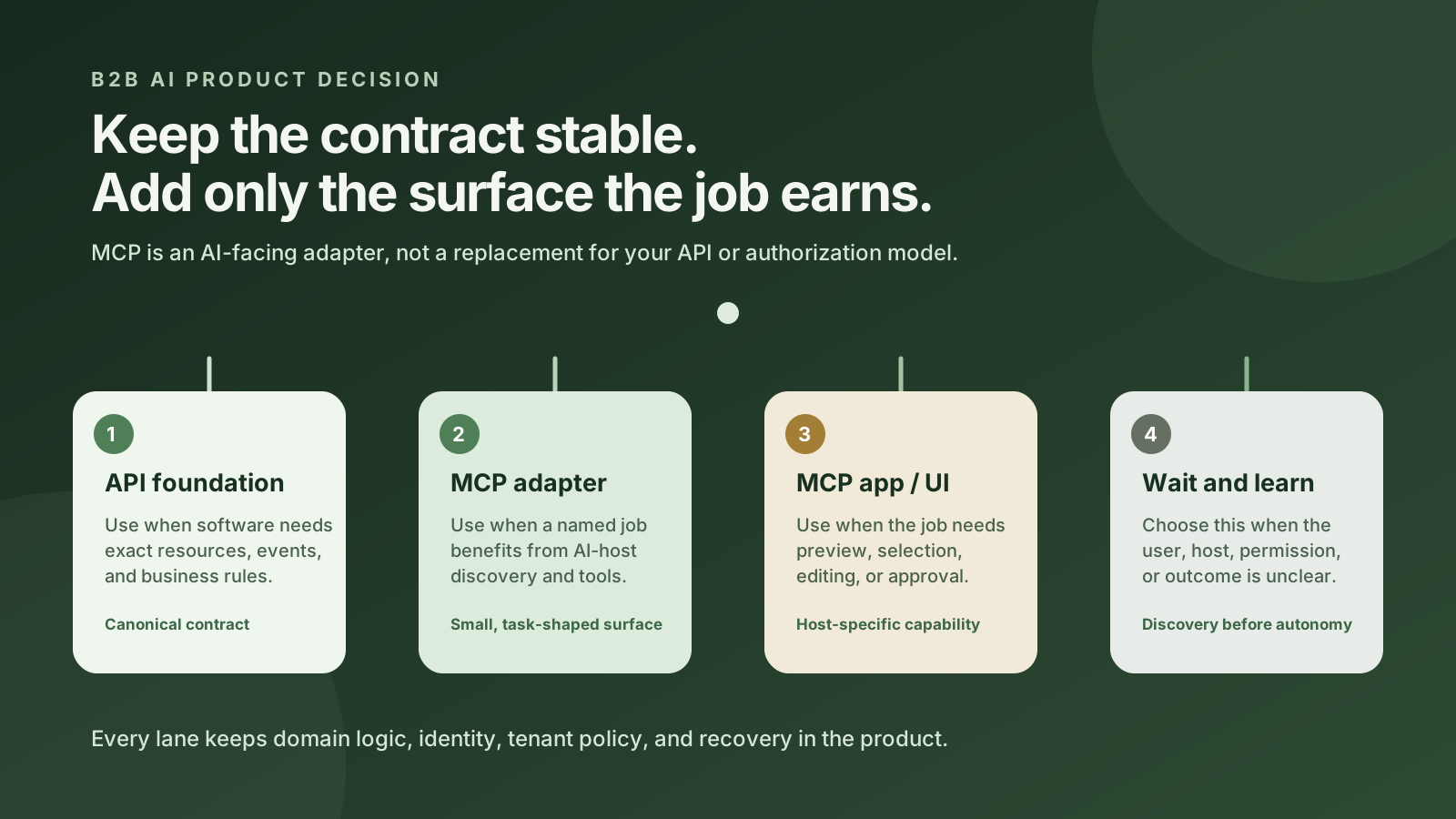
My recommendation: keep your ordinary API and domain logic as the foundation. Add a focused MCP server when a named customer workflow benefits from being discovered and used inside supported AI hosts. Make the MCP layer task-shaped, permission-aware, observable, and small. Build an interactive MCP app only when the job needs a visual surface. If there is no clear host, user, workflow, authorization model, or measurable outcome, wait.
This is not a prediction that every B2B product will need MCP. It is a decision guide for the teams that are trying to separate a useful integration from a protocol-shaped side project.
The short answer
MCP, or Model Context Protocol, is an open protocol for connecting AI applications to external data, tools, and workflows. The current MCP documentation describes a host coordinating client connections while servers expose capabilities such as resources, tools, and prompts. In plain English, an AI host can discover a server's advertised capabilities and use them through a common interaction shape.
That gives a B2B product a possible new distribution surface. A customer may want an assistant to look up account information, prepare a report, create a draft, or start an approved workflow without leaving the AI application they already use. A remote MCP server can make those capabilities available to a compatible host.
But the protocol is only one layer of the decision. Use this quick filter:
- Keep the API as the foundation when software, integrations, webhooks, or your own application need a stable business contract.
- Add a focused MCP adapter when a real user workflow benefits from AI-host discovery, model-readable descriptions, live product data, or a small set of controlled actions.
- Add a visual MCP app or companion UI when the job requires a board, form, preview, comparison, or other interface that prose and tool calls cannot express well.
- Postpone when the request is speculative, the host is unknown, the tool boundary is vague, or the product cannot yet explain who may do what for which tenant.
The same product can choose more than one lane. An API can remain the canonical backend contract. An MCP server can translate a few customer jobs into model-friendly tools. A web application can remain the best place for a complex approval flow. This is not an either-or architecture unless a team makes it one.
| Surface | Best first question | What it should own | What it should not pretend to own |
|---|---|---|---|
| Ordinary API | What business resource or operation must software call? | Stable schemas, domain rules, authentication, authorization, webhooks, errors, and versioning. | Model tool selection or a conversational user experience. |
| MCP adapter | Which customer job should an AI host discover and complete? | Tool names, descriptions, schemas, safe outputs, host compatibility, and translation to domain calls. | Permission to bypass the product's existing policy or to improvise business rules. |
| MCP app or UI | Does the job need a visual state or user interaction? | Preview, selection, confirmation, editing, or a rich result inside a host that supports it. | Universal availability across every MCP client. |
| No new surface yet | What would a customer actually do with this next week? | Discovery, workflow definition, and a small proof with a named operator. | Evidence of product value simply because the protocol is popular. |
The rest of this guide explains how to make that choice without confusing an easy demo with a finished integration.
What an MCP server actually is
The easiest way to understand MCP is to compare it with a familiar API. An API exposes resources and operations to software. A client sends a structured request, the server authenticates it, applies policy, runs domain logic, and returns a structured response. A well-designed API can be used by a web app, a mobile app, another service, or an integration partner.
An MCP server exposes a model-readable set of capabilities to an AI host. The host may be a coding assistant, a desktop assistant, an enterprise agent, or your own application. The server can advertise tools, resources, and prompts. A tool usually has a name, description, input schema, optional output schema, and annotations about behavior.
That distinction matters because a model does not choose an operation the way a typed SDK does. It looks at descriptions and schemas, relates them to the user's request, and proposes a call. The server then receives that call and has to decide whether it is valid and authorized. The model's ability to describe an action is not proof that the action should run.
The official MCP tools specification is unusually direct about this boundary. Tools are designed to be model-controlled, and the specification recommends that applications give people a way to deny invocations and see what is being exposed. It also says the available tool set may vary by the authorization presented on the request. That is a useful product clue: your server should not necessarily show every possible capability to every caller.
Think of the layers like this:
- Your domain layer knows what an account, invoice, campaign, ticket, or project means.
- Your API or service layer enforces the product's business rules and ordinary integrations.
- Your MCP adapter translates a small number of user jobs into tools an AI host can discover.
- The AI host decides how to present the tools, when to ask for consent, and how to combine them with the model.
- The model interprets the request and proposes the next tool call. It is not the final authority on identity or access.
The 2026-07-28 MCP specification makes the deployment conversation more practical. The release removed protocol-level sessions and the initialize handshake, added discovery and cacheable list results, and moved the core toward ordinary HTTP infrastructure. That can simplify horizontal scaling. It does not remove application state. If your workflow needs state, the application still has to model it explicitly, persist it safely, and bind it to the correct user and tenant.
This is why “MCP server” should not be shorthand for “a new backend.” In many products, the best implementation is a thin remote adapter that reuses the same service functions and authorization checks as the existing product. The new work is the translation layer and the operational contract around it.
The four product choices: API, MCP adapter, MCP app, or no new surface
Before you write a tool definition, name the product surface you are actually buying. The protocol choice follows from the job.
Choice one: improve the API and stop there
This is the right answer more often than a roadmap makes it sound. If customers need reliable integrations, an API with clear resources, scopes, webhooks, idempotency, and versioning is still valuable. If the current API cannot express the job cleanly, an MCP wrapper will not make the underlying operation clearer. It may only hide the awkwardness behind a natural-language description.
Improve the API first when the buyer is another software team, when requests need exact control, when the workflow is high-volume, or when multiple non-AI clients will use the same capability. The API is also the place where you should keep the canonical domain semantics. An MCP tool can call it, but it should not quietly invent a second definition of an invoice, a user, or an approval.
Choice two: add an MCP adapter over the existing product
This is the most common sensible path for a B2B product with a working backend. Choose one or two jobs that are difficult to discover through a raw API but easy to describe in plain language. Examples might include “prepare a weekly pipeline brief for this account,” “find open incidents that match this service,” or “draft a renewal risk summary from the current customer records.”
The adapter can call several ordinary services in a controlled sequence and return a result designed for the AI host. It might combine account lookup, permission filtering, document retrieval, and a report endpoint. That is different from exposing every internal endpoint as a separate tool.
Choice three: add an interactive surface
Some work is not finished when the model returns text. A buyer may need to inspect a table, choose records, compare versions, edit a draft, preview a change, or confirm a specific side effect. If the target host supports an MCP app or embedded UI, that surface can make the workflow more usable.
Do not assume that an app-style surface is available wherever a normal MCP tool is available. Treat UI support as a host capability to test. The fallback should be clear: the tool can return a structured result, link to your product, or stop before the action.
Choice four: wait and learn
Waiting is a product decision when the problem has not earned a new interface. You can interview the requester, capture the manual workflow, expose a read-only API example, or run a supervised internal test. That work tells you whether the real need is a tool, a report, better permissions, or a regular product feature.
A good stop condition is simple: if you cannot name the user, the host, the source of truth, the desired output, and the action that must never happen automatically, you do not have an MCP feature yet. You have a discovery task.
When an MCP server earns its place
An MCP adapter earns its place when it removes a real piece of friction that an ordinary integration does not remove as well. There are four strong signals.
1. Your customers already work inside compatible AI hosts
The current MCP introduction lists support across multiple AI assistants and development tools, and OpenAI's current API documentation supports remote MCP servers as a tool type. Anthropic's MCP documentation also describes AI applications connecting to data sources, tools, and workflows through the protocol. These are meaningful ecosystem signals.
They are not proof that your customers will use your server. A developer tool customer may already live in an MCP-capable coding environment. A support team may use an enterprise assistant with a connector directory. A small operations team may use none of these things and prefer your normal dashboard.
Ask what the customer is already trying to do. “We want MCP” is a useful start, not a complete use case. “We want our assistant to pull the right account records and draft a renewal note without exposing billing data” is much closer to a product requirement.
2. The job benefits from discovery and composition
MCP is useful when the user does not want to learn your endpoint catalog before asking for help. A model can discover a small set of tools and combine them into a job. That can be especially helpful when a workflow crosses several resources but the customer thinks in outcomes rather than endpoints.
For example, a customer does not naturally say, “Call endpoint A, paginate endpoint B, filter endpoint C, and pass the result into endpoint D.” They say, “Show me the accounts that need attention this week and prepare the context for each conversation.” A task-shaped MCP tool can reflect that job while your domain services continue to own the actual rules.
3. Live data or controlled action is the point
An MCP server is a better candidate when the assistant needs current product data or must request a product action. If the use case is only a static explanation, documentation, or a downloadable file, a normal guide or API response may be enough.
OpenAI's plugin guidance says to add an MCP server when a use case needs live data, authentication, controlled actions, or code running on infrastructure the developer operates. That is a useful boundary. It frames the server as an operational capability, not just a new place to put prompts.
4. You can make the first release narrow
The first MCP release should be small enough that one person can explain every tool and every permission. A server with three excellent tools is more useful than a server with forty vague tools that the model and the user cannot distinguish.
Start read-heavy. Let the assistant find, summarize, classify, compare, or draft. When you add a write, make the proposed target, arguments, authorization, approval state, and expected result visible. A tool call should never be the only record of why a side effect occurred.
Why your API is still the foundation
It is easy to talk about MCP as a replacement for APIs because both can expose operations to software. That framing will create unnecessary maintenance. MCP and APIs solve related but different problems.
Your API is usually the stable contract between your product and software clients. It should have resource identifiers, explicit error behavior, pagination or streaming rules, idempotency where needed, versioning, and predictable authorization. It should be testable without a model and usable by a client that has no idea what MCP is.
Your MCP layer is a translation and discovery surface for AI applications. It has to explain capabilities in language a model can use. That means tool names, descriptions, examples, input schemas, output schemas, and side-effect annotations matter. It also means you should think about the order and number of tools a host sees.
A thin adapter can protect both sides:
- The API keeps the canonical resource and business rules.
- The adapter turns a customer job into a focused tool contract.
- The model chooses among the tools, but does not receive a generic database or unrestricted request executor.
- The server re-checks the user's identity, tenant, scope, target, and arguments before calling the domain layer.
- The response includes enough structure for the host and user to understand what was found or changed.
Amazon Bedrock AgentCore's current gateway documentation makes this layering explicit from another angle: its gateway can connect to MCP servers and convert APIs or Lambda functions into MCP-compatible tools. That is an example of using MCP as an access surface while keeping existing application capabilities behind it.
The practical implication is that “we already have an API” is not a reason to reject MCP. It is often the reason an MCP pilot can be small. Reuse the handler and domain logic. Add a deliberate tool contract. Do not copy the entire API into a second, unmanaged implementation.
Design tools around jobs, not endpoints
The fastest way to make an MCP server frustrating is to mechanically expose every endpoint. An endpoint catalog is organized around internal resources and implementation history. A model and a user are trying to finish a job.
Suppose your product has endpoints for accounts, contacts, opportunities, notes, tasks, and activities. A raw wrapper might expose a dozen tools with similar names. The model now has to infer which combination produces “prepare for my call with Acme.” A task-shaped tool might instead be called prepare_account_brief, with an explicit account identifier and a structured result containing the source records, freshness timestamps, open items, and missing data.
That does not mean every tool should be a giant super-tool. Large tools with many unrelated modes become difficult to authorize and difficult for models to call correctly. The useful middle is a focused operation with a recognizable purpose, clear inputs, and a result that maps to one step in the workflow.
For every proposed tool, answer these questions:
| Design question | Good answer | Warning sign |
|---|---|---|
| What job does it support? | “Find overdue renewals for one authorized workspace.” | “Perform account operations.” |
| What is the smallest input? | A validated workspace and optional date range. | A free-form query, arbitrary filter object, or raw SQL string. |
| What does success look like? | A structured list with record IDs, freshness, and an empty-state answer. | A paragraph that says “done” without naming what was read or changed. |
| What can it change? | Nothing, or one explicit reversible action behind approval. | It can create, update, delete, publish, and message depending on a mode string. |
| Who can call it? | A named identity with a scope and tenant check. | The prompt says “the user asked,” so the server trusts the model. |
OpenAI's current MCP server guidance recommends one tool for each distinct action a plugin must support, with an action-oriented name, a human-readable description, an explicit input schema, an output schema where appropriate, accurate safety annotations, and a handler that authorizes the request. That is good advice even if your target host is not OpenAI.
Reuse your API's validation, but do not assume API descriptions are already good model instructions. Add examples of valid inputs and the expected empty or denied result. Explain whether an identifier is a product ID, an external ID, or a human name. Say when the tool will ask for more information. Say whether it reads, creates, updates, sends, publishes, or deletes.
Tool descriptions are part of the user experience. They are also part of the attack surface. A model can be steered by confusing or hostile tool metadata, and a human may approve a tool they do not understand. Keep descriptions accurate, short, and boring in the best possible way.
Authentication, tenants, and the write boundary
The most underestimated part of a remote MCP server is not registering a tool. It is making the server behave like a real multi-tenant product.
The current MCP authorization specification defines an OAuth-oriented path for protected HTTP servers. It describes the MCP server as a resource server, the client as an OAuth client acting for a resource owner, and the authorization server as the component that issues tokens. The current specification also says authorization is optional for MCP implementations. That combination is important: the protocol gives you a path, but it does not require every deployment to have the same auth model or implement your product's access policy for you.
For a protected remote server, the current specification covers protected-resource metadata discovery, client registration choices, resource indicators, bearer-token use, audience validation, and least-privilege scope selection. It also requires that tokens be intended for the server and says servers must not accept or pass through tokens that were issued for another resource.
Translate that into product questions:
- Which human or service identity is asking?
- Which tenant, workspace, project, or account is in scope?
- Which MCP client or host is connecting, and what support does it actually have?
- Which scopes are needed for discovery, reading, drafting, and writing?
- Does the tool list change for the caller's authorization?
- Which action needs a separate approval?
- What happens when a token is expired, the user leaves the tenant, or a scope is removed?
- Where are authorization decisions and tool results logged?
Do not let the model answer these questions. The model can propose “update the campaign for workspace West.” Your server should resolve the authenticated principal, verify that West belongs to the caller, validate the campaign ID, check the exact operation, and reject the call if any part is ambiguous.
The write boundary deserves its own design. A read tool can often return data after ordinary authorization. A write tool should usually produce a structured proposal first. The proposal can include the target ID, exact fields, old value, new value, source evidence, expected side effect, and expiration time. A user or an application policy can approve that exact proposal. If the target or arguments change, the approval should not silently carry over.
OpenAI's remote MCP documentation defaults to approval before data is shared with a connector or remote server and supports filtering approvals by tool. Its safety guidance warns that a remote server can exfiltrate data from the model's context or take action in connected services. That is a host-specific implementation, but the product lesson travels: make data sharing and side effects visible, and do not turn off approvals just to make a demo feel smooth.
Gateways introduce another policy question. AWS documents JWT, IAM, and offloaded authorization for AgentCore Gateway. AWS also warns that authenticate-only and no-authorization modes do not enforce authorization by themselves. If you place a gateway in front of an existing service, name the component that actually denies unauthorized access. “There is a gateway” is not an authorization answer.
If your system is paid, add commercial identity to the same conversation. Which account is billed for a call? Are read and write tools metered differently? What happens at a quota boundary? How does a customer revoke a connection? A public builder discussion about MCP server operations surfaced auth, API-key management, usage metering, and billing as work that took more time than the tool logic. That is an anecdotal signal, not a universal estimate, but it is exactly the kind of work a roadmap should budget.
The operational cost people underestimate
A local MCP server can be a tiny script. A public, multi-tenant MCP service is a normal production workload with an unusual client boundary. It needs the same discipline as any other integration service.
Protocol and SDK compatibility
The 2026-07-28 MCP release is current as of this article's August 27, 2026 publication pass. It changed the lifecycle by removing protocol-level sessions and the initialization handshake, adding a discovery call, and treating remote MCP more like an ordinary HTTP workload. The official TypeScript SDK v2 documents support for that revision and lists integration paths for common JavaScript runtimes and web frameworks.
That is good news for new deployments and a migration concern for old ones. A server should record which protocol versions and transports it supports, test the actual hosts it intends to serve, and watch SDK release notes. Do not infer compatibility from a successful tools/list call alone.
A public TypeScript SDK issue provides a useful implementation warning. The issue reports a regression in a reused stateless transport path where the first request succeeded and later requests returned a 500 for certain versions. The report is not evidence that every deployment fails this way. It is evidence that runtime behavior needs repeatable tests across multiple requests, versions, and deployment shapes.
Availability and recovery
The assistant may call your server at inconvenient times, retry after a timeout, or run several tool calls in a single user interaction. You need request IDs, timeouts, rate limits, circuit breakers, and structured errors. If an operation can outlive the request, give it an explicit job or task contract and make the status observable. The My Mind guide on AI agent background jobs covers the difference between keeping a request open, returning a job ID, and using durable workflow state.
Idempotency matters even more when a tool can change state. Imagine your server accepts a request to create a task, the downstream API succeeds, and the response times out. A model or host may retry. Without an idempotency key or a lookup-before-create pattern, the same conversation can create duplicates. The right answer is not “the model should remember.” The server should know whether the effect already happened.
Observability and support
An MCP receipt should answer what a normal request log answers, plus a few host-specific questions:
- Which MCP client and protocol version connected?
- Which tools were advertised to this caller?
- Which tenant and principal were resolved?
- Which tool was proposed, with which validated arguments?
- Which policy and approval checks ran?
- Which downstream API calls occurred?
- What data was returned to the host?
- Did the business effect complete, fail, or remain unknown?
Log enough to support a diagnosis without retaining sensitive prompts and documents forever. Put retention, redaction, access, and deletion rules around tool inputs and outputs. A server that can explain a failed run is easier to support than one that only reports “the assistant got confused.”
Host differences
“MCP-compatible” is not a complete compatibility matrix. Hosts may differ in remote URL support, OAuth discovery, client registration, approval UX, tool filtering, UI support, long-running tasks, and how they display results. The GitHub MCP server documentation, for example, notes that configuration processes and stability vary by host and provides separate guidance for several clients.
Pick the clients that matter to your buyer. Test connection, login, tool discovery, read calls, denied calls, approval, errors, retries, and user-visible output in each one. If a host cannot deliver a core workflow, state that limitation clearly. Do not promise a universal “connect anywhere” experience because the protocol is open.
Tool lists, context, and progressive disclosure
The protocol's discovery model creates a product tradeoff. A host needs enough tool information to choose correctly, but every extra description and schema competes for attention and context. The MCP tools specification says servers should return tools in a deterministic order and supports pagination and caching in the current revision. It also allows the set to vary by authorization.
A public issue in the MCP Python SDK describes the concern plainly: when several servers or a large server inject a full tools/list payload into every model turn, larger prompts can affect latency, cost, and tool-choice clarity. The issue proposes grouping or partial loading. That proposal is not a protocol decision or a universal benchmark. It is a useful user signal that tool inventory design matters before a server grows.
GitHub's first-party MCP server takes a practical approach. Its documentation supports toolsets, individual tool allowlists, and read-only mode. It says enabling only the toolsets needed can help tool choice and reduce context size, and that read-only mode skips write tools even when they are requested explicitly.
Borrow the principle, not necessarily the exact implementation:
- Start with discovery and a small read-only set.
- Group tools around jobs or product areas a human can recognize.
- Use authorization to avoid advertising capabilities the caller cannot use.
- Keep dangerous tools separate from routine reads.
- Return a clear empty result and a clear denied result.
- Measure tool selection, retries, approval abandonment, and support questions.
Progressive disclosure can take several forms. Your server might expose a small search or describe tool that helps the host find a relevant capability. A host might filter tools. An enterprise gateway might impose a tenant-specific allowlist. A web application might route complex work back to a full-screen workflow. The right pattern depends on the host, so do not bake a single client workaround into your product without testing it.
There is a design tension here. A single “execute” tool reduces the visible tool count, but it can create a broad and opaque action boundary. Many tiny tools improve explicitness but can overwhelm selection. The answer is not a magic number. It is whether each tool has a distinct job, a narrow permission, and an output that helps the next step.
Build, buy, or postpone
“Build an MCP server” and “buy an MCP gateway” are not opposing ideologies. They are ownership choices.
Build the adapter yourself when
- Your existing service layer already owns the business rules.
- The first tool set is small and tied to a known customer job.
- You need product-specific authorization, tenant logic, or output shaping.
- You want full control over the server URL, logs, versions, and host compatibility.
- Your team is willing to own protocol upgrades, auth integration, monitoring, and support.
Use the official SDK that matches your stack, but treat the SDK as plumbing. It can validate schemas and handle transport. It cannot decide your tenant policy or whether “publish” should require an approval step.
Use a gateway or managed layer when
- You have several existing APIs or servers and need centralized routing, identity, policy, or telemetry.
- You want to onboard MCP without moving domain logic into each server.
- The infrastructure burden, not the tool design, is the main bottleneck.
- The vendor's isolation, region, support, and retention terms fit your customers.
A gateway should reduce repetitive infrastructure, not hide the policy boundary. Ask where authorization runs, how tokens are exchanged, how a tenant is resolved, which tools are exposed, how logs are retained, how a customer disconnects, and how you leave the platform later. AWS's current AgentCore documentation is a good reminder that “offloaded authorization” can mean the gateway is not making an authorization decision at all. Identify the actual enforcement point.
Keep the API and do not add MCP yet when
- The requester cannot name a host or customer workflow.
- Your API still has unclear resource semantics or weak tenant boundaries.
- The requested tools are mostly high-impact writes.
- You would have to expose a generic query executor to make the demo work.
- Your team has no owner for auth, support, versions, and incident response.
One recent public production discussion from an API product builder asked how to design a multi-tenant MCP implementation and received advice about stateless transport, OAuth, REST equivalents, rate limiting, monitoring, and testing across clients. Another public thread described the auth and billing layer as more difficult than the first server logic. Those are qualitative signals from builders, not universal timelines. They point to the same practical conclusion: the protocol call is the beginning of ownership, not the end.
A practical 30-day MCP pilot
You can test the product decision without turning your entire roadmap into “AI infrastructure.” Make the pilot narrow enough that each failure teaches you whether MCP is helping.
Days 1–4: write the job contract
Choose one workflow with a named owner. Write it in this form:
Example: “For an authorized account manager, prepare a current renewal brief for one customer workspace. Read the renewal record, recent support events, and open commitments. Finish with a brief that names its source records and freshness. Stop before editing the account or sending a message.”
Record the target host or hosts, the source of truth, the input identifier, the empty state, the denied state, the data that must not leave the product, the operator who reviews the result, and the one action that must never happen in the first pilot.
Days 5–8: compare the non-MCP baselines
Try the ordinary API, an internal service call, and a manual workflow. The goal is not to make MCP win. The goal is to understand what it would add.
Ask:
- Can the existing API already support the job?
- Would a small SDK or integration example solve the discovery problem?
- Does the task require current data or an action, or only explanation?
- Which steps are deterministic and which require interpretation?
- What should a user see when there is no match or access is denied?
If the API solves the job with acceptable friction, the pilot may end there. That is a useful outcome. MCP should earn its extra surface area by making the actual user path better.
Days 9–13: build three focused tools
Start with a read or prepare operation. Design the tool names, descriptions, input schemas, output schemas, and safety annotations before connecting a model. Reuse the same domain handlers as the API. Reject unknown fields and ambiguous human names. Return record IDs, tenant context, source timestamps, and structured errors where they help the operator.
Do not begin with a generic query_anything, run_sql, or execute_action tool. Those are convenient for a demo because they outsource product design to the model. They are difficult to reason about, authorize, and support.
Expose only the first job's capabilities. Keep write tools disabled or behind an explicit feature flag. Add a client-specific configuration for the hosts you actually plan to test.
Days 14–18: test identity and negative paths
Test the cases that a happy-path demo hides:
- valid user, valid tenant, valid record;
- valid user, wrong tenant;
- valid tenant, missing record;
- expired token or insufficient scope;
- tool not available to this caller;
- empty search result;
- stale downstream data;
- malformed input and extra fields;
- slow downstream API and retry;
- source content containing an instruction that conflicts with the job.
The expected result for several of these should be a stop, a denial, or a human-review state. A polished final answer is not a pass if the server crossed a tenant boundary or returned a record it should not have exposed.
Days 19–23: test the host experience
Connect the server to each host that matters. Verify the login or token flow, the displayed tool descriptions, the list of tools, approval prompts, denied calls, structured results, errors, and reconnect behavior. Test what happens if the host does not support a feature you expected, such as a UI surface or a newer protocol revision.
Ask a person who did not build the server to complete the job. Watch where they hesitate. If they cannot tell which tenant is being used, whether the result is fresh, or what will happen after approval, the tool contract needs work.
Days 24–27: add one controlled side effect
Only add a write if the read path is understandable and the action is bounded. Use a proposal or preview. Bind approval to the exact target and arguments. Make the server re-check authorization at execution time. Add an idempotency key or a reliable duplicate check. Record the before state, the requested change, the authorization result, the approver, and the after-state verification.
If the action cannot be independently verified, keep the tool read-only. “The host displayed a success message” is not enough if the product did not confirm the actual business state.
Days 28–30: choose the next lane
Compare the manual flow, ordinary API, and MCP flow on the whole job. Do not measure only model latency or whether the answer sounded good.
- Did the correct user and tenant reach the correct data?
- Did the tool description help the host choose the right action?
- Could a person understand the result and its sources?
- How often did the system stop for a case the operator could resolve?
- Did any retry create a duplicate or leave the effect unknown?
- How much auth, monitoring, support, and host-specific work did the adapter add?
- Can the customer revoke access and can the team disable one tool without taking down the product?
- Is the MCP flow better enough for a named user to keep using it?
Choose one outcome:
- Keep the API. The ordinary contract is the right surface for this job.
- Ship a thin MCP adapter. A real workflow benefits from discovery and model-readable tools.
- Add a host-specific UI. The workflow needs preview, selection, or editing that tools alone cannot express.
- Use a gateway. Central policy, routing, and operations are now the bottleneck.
- Postpone. The user, host, permission, or definition of done is still unclear.
Write the next stop condition before expanding scope. Stop if the tool list grows faster than your ability to test it, if support cannot reconstruct a run, if authorization is being decided by prompt text, if a host cannot show consequential actions clearly, or if the work removed from the operator is smaller than the work needed to supervise the agent.
What I would predict next
Inference, not a reported fact: the useful B2B pattern will be a layered product surface, not an MCP-only backend. APIs will remain the system-facing contract. MCP adapters will translate a small set of jobs for AI hosts. Rich apps and ordinary web screens will handle the moments that need visual review. Gateways will centralize identity and policy where several capabilities need to be governed together.
The current direction of the protocol supports that prediction: the 2026-07-28 release moved toward stateless HTTP infrastructure, the official ecosystem is documenting server SDKs and remote connections, and maintainers are still discussing discovery, identity, versioning, and tool-context shape. The details will change. The ownership question will not.
The durable asset is not the word MCP in your roadmap. It is a clear job contract, a stable domain operation, a narrow tool surface, a permission decision, and an evidence trail that survives a model or host change.
FAQ
Is MCP replacing our API?
Usually no. Keep the API as the canonical contract for your own applications, software integrations, webhooks, and exact business operations. Add MCP as a model-facing adapter when a real workflow benefits from AI-host discovery or composition. Reuse the same domain logic and authorization checks instead of creating a second definition of your product.
Should a SaaS company build an MCP server now?
Build a small pilot when you can name a customer workflow, a supported host, the data and actions in scope, the permission boundary, and the result that proves completion. If the request is only “we should have MCP” and nobody can name what a user will do with it, improve discovery or the API first.
Can we generate MCP tools from our existing API?
You can use the existing API schema and handlers as a starting point, but do not assume a one-to-one wrapper is a finished product. Hand-design tool names, descriptions, examples, output shape, side-effect annotations, scopes, pagination behavior, and empty states. Add tests for the host's actual tool selection and authorization paths.
Does MCP handle authentication and multi-tenancy for us?
No. The current specification describes an authorization path for protected HTTP servers, but your product still has to implement identity, token validation, tenant resolution, scopes, revocation, and per-operation authorization. Never let the model decide whether a user may access a record. The server should enforce that on every request.
How many tools should an MCP server expose?
Enough to complete the named job, not enough to reproduce your entire endpoint catalog. Start with a small read-only set. Group capabilities where the host supports it, filter by authorization, keep descriptions distinct, and measure tool-choice confusion and support incidents. There is no universal tool count that works for every product.
Should we use a managed MCP gateway?
Consider one when centralized routing, identity, policy, telemetry, or connecting many existing services is more work than your team wants to own. Verify where authorization actually runs, how data is retained, how tools are allowlisted, how customers disconnect, and how you migrate away. A gateway can reduce infrastructure work; it cannot replace your product's domain policy.
The practical next step
Pick one workflow that a customer or operator already wants to perform in an AI host. Write down the user, tenant, source of truth, exact output, allowed tools, denied cases, side effect that must wait, and evidence that proves completion.
Then compare the ordinary API with a focused MCP adapter. If the API is enough, keep it. If MCP makes the actual job easier to discover and use, build the smallest adapter that earns that benefit. If the team cannot define the boundary, postpone the protocol and do the workflow discovery first.
BishopTech can help turn the messy request into a practical integration decision: API design, a focused MCP adapter, a governed automation, a host-specific workflow, or a reason to wait. Explore the custom software approach or automation systems if the next step is implementation. For a scoped recommendation tied to the real workflow, start a BishopTech consultation.
Return to the My Mind research collection, or read the practical guide to agentic AI, why agent security is an authorization problem, and when a B2B workflow needs a browser, an API, or neither.
Sources and further reading
The links below are dated references used for the distinctions and framework in this article. Official protocol, SDK, cloud, and platform documentation supports technical facts. GitHub issues, discussions, and Reddit threads are included as qualitative implementation signals only. They are not surveys, universal failure rates, search-volume data, or customer proof.
- Model Context Protocol — The 2026-07-28 Specification — July 28, 2026; current release changes including stateless transport, discovery, cacheable lists, tasks, and authorization hardening.
- Model Context Protocol — Architecture — 2026-07-28 specification revision; host, client, and server roles plus local and remote deployment boundaries.
- Model Context Protocol — Tools — 2026-07-28 specification revision; model-controlled tools, schemas, annotations, authorization-dependent tool lists, and human confirmation guidance.
- Model Context Protocol — Authorization — 2026-07-28 specification revision; protected HTTP servers, OAuth-oriented discovery, scopes, resource indicators, token audience, and authorization boundaries.
- Model Context Protocol — TypeScript SDK v2 — current documentation accessed August 27, 2026; server SDK, schema validation, supported runtimes, and 2026-07-28 compatibility.
- Model Context Protocol — Introduction — current 2026 documentation; plain-language explanation of servers, clients, tools, data sources, workflows, and ecosystem support.
- OpenAI Developers — MCP and Connectors — current documentation accessed August 27, 2026; remote MCP configuration, tool discovery, calls, approvals, tool filtering, and data-sharing risks.
- OpenAI Developers — Build an MCP server — current documentation accessed August 27, 2026; focused user-goal tools, schemas, annotations, live data, controlled actions, and server-side authorization.
- AWS — Set up inbound authorization for your gateway — current documentation accessed August 27, 2026; JWT, IAM, offloaded authorization, and the warning that offloading without an enforcement point leaves a gap.
- AWS — AgentCore Gateway and policy core concepts — current documentation accessed August 27, 2026; converting APIs or Lambda into MCP-compatible tools and evaluating policy on tool invocations.
- GitHub — GitHub MCP Server README — current repository accessed August 27, 2026; toolsets, individual tool allowlists, read-only mode, and context-size guidance.
- r/mcp — Building Production MCP Servers — April 24, 2026; public builder signal about context bloat, task-shaped tools, hosting, gateways, access control, and telemetry.
- modelcontextprotocol/python-sdk issue #2619 — Context bloat — opened May 16, 2026; public implementation signal about tool-list size, latency, cost, and tool-choice ambiguity.
- r/mcp — What architecture for MCP in production — August 19, 2026; public builder signal about multi-tenant architecture, OAuth, REST equivalents, monitoring, and client differences.
- r/mcp — How are you handling auth and billing in your MCP servers? — July 2026 as displayed by Reddit; public builder signal about authentication, metering, billing, and operational work.
- modelcontextprotocol/typescript-sdk issue #1994 — Stateless transport regression — opened April 30, 2026; public implementation signal about multi-request compatibility testing and transport reuse.