
If your B2B product touches PDFs, scans, invoices, contracts, forms, spreadsheets, or screenshots, the tempting question is: “Which AI model should read them?” The better question is: “What information has to survive the document boundary, and what happens when the system is unsure?”
That shift matters because a document is not just text waiting to be copied into a prompt. It is a file, a set of pages, a visual layout, a collection of relationships, and sometimes a source of evidence for a business action. A purchase order is not merely a paragraph. A table is not merely a sequence of numbers. A signature, checkbox, footnote, column header, or handwritten correction can change what the document means.
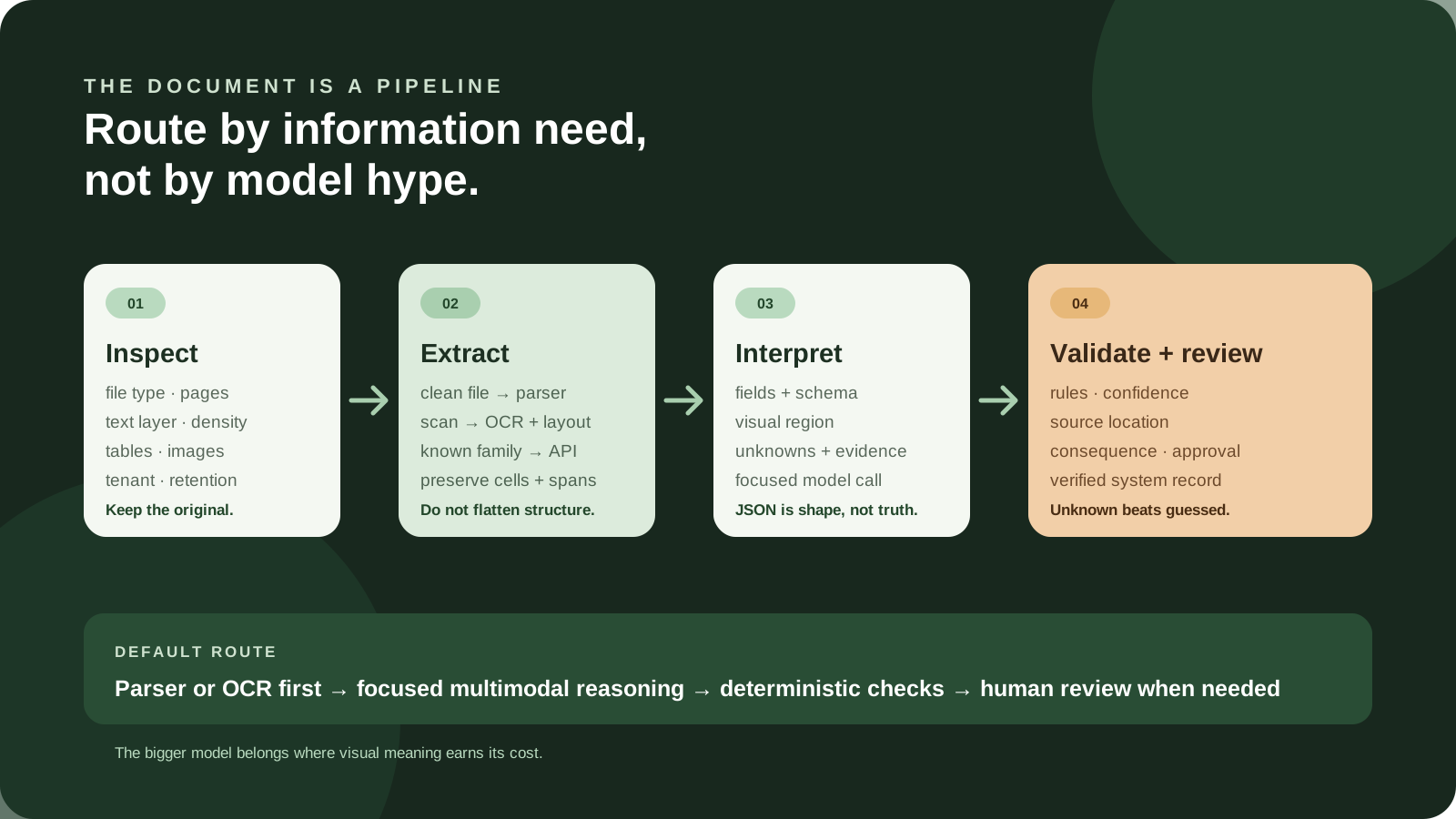
My short recommendation: start with the least expressive tool that preserves the information your workflow needs. Use a native parser for clean, machine-readable files. Add OCR and layout extraction for scans, images, forms, tables, and coordinates. Use a specialized Document AI API when the document family and field contract are stable. Use a multimodal model when visual context or flexible interpretation is genuinely part of the job. Send ambiguous or consequential cases to a human. For mixed document sets, a hybrid pipeline is usually the honest default.
Do not send every page through the biggest vision model simply because it can accept images. Do not treat valid JSON as proof that the values are right. Do not copy a confidence threshold from a vendor example and call the queue safe. And do not let extracted data trigger an irreversible action until the system has checked the evidence, the business rules, and the authorization boundary.
The short answer: route by document and consequence
There is no single “document AI” lane. There are several useful lanes, each with a different job. A clean PDF with a stable text layer is a very different input from a photographed form with handwriting and a table that continues across six pages. A product catalog can tolerate a review pass. A document that would create an external commitment deserves a more deliberate stop.
| Lane | Use it first when | What it gives you | What it does not prove |
|---|---|---|---|
| Native parser | The file is digital, the structure is available, and the task is repeatable. | Text, paragraphs, spreadsheet cells, document properties, or other machine-readable structure. | That a visual detail, scan, chart, or business meaning was captured. |
| OCR and layout | The input is scanned, photographed, image-heavy, or dependent on page geometry. | Recognized text, reading order, blocks, tables, checkboxes, coordinates, and sometimes confidence. | That a value was interpreted correctly or that the table relationship is usable for your job. |
| Specialized Document AI | You have known document families such as invoices, receipts, forms, or identity documents. | Managed processors, typed fields, prebuilt schemas, queries, model versions, and provider-specific controls. | That the vendor's default schema fits your variants or that a confidence value is calibrated for your outcome. |
| Multimodal model | Charts, figures, visual context, fine print, handwriting, or changing semantic questions matter. | Flexible interpretation of image and text context, plus a path to structured output. | That it saw every small character, preserved every cell relationship, or abstained when it should. |
| Human review | The input is ambiguous, the rules fail, or the consequence of a wrong value is material. | Judgment, exception handling, correction, and feedback for future improvements. | That the review queue is fast, consistent, or properly designed without clear review rules and ownership. |
| Hybrid pipeline | Your files vary and no single tool is good at every layer. | Different tools for different pages, with validation and evidence carried between stages. | That complexity is free. Routing, fallbacks, versioning, storage, and monitoring become your responsibility. |
If you need a starting point, use this order: inspect the input, classify the document or page, preserve the original, extract structure, add semantic interpretation only where needed, validate the result, and route exceptions. That sequence is less exciting than announcing a fully multimodal agent. It is much closer to the work a real product has to support.
This is also why the question is different from whether to use retrieval or fine-tuning. Those techniques may matter after you have a usable document representation. The first decision is earlier: can your system reliably turn the source file into the right evidence and structure? The existing RAG versus fine-tuning guide is useful once you know what knowledge your downstream AI actually receives.
“Understanding a document” is at least six different jobs
Teams often say “we need document understanding” when they mean one of several outputs. Naming the output is a practical way to avoid overbuying the model.
1. Read the bytes and identify the file
Before extraction, your system needs to know what it received. Is it a PDF, DOCX, XLSX, image, presentation, email attachment, or something that only claims to be one of those? Is it encrypted or password-protected? Is the file empty, oversized, corrupted, or a duplicate? Is a multi-page packet actually several documents stapled together digitally?
This is not glamorous AI work, but it prevents expensive confusion. A native DOCX parser and a photographed page should not start with the same inference request. A spreadsheet may have formulas, hidden sheets, and merged cells that are more useful through a workbook parser than a screenshot. A PDF may have selectable text, no text layer, or a mixture of both.
Make intake produce a small record: file type, size, page count, hash, origin, upload time, tenant, and whether the file passed basic checks. Preserve the original in the storage boundary your product has chosen. If you cannot retrieve the exact input later, you cannot explain what the system extracted from it.
2. Extract text
Text extraction answers a narrow question: which characters and words appear to be on the page? For a clean digital file, a native parser may return this with excellent speed and low cost. For a scan, OCR converts pixels into text. That text may be enough for search, a rough summary, or a later classification step.
Text alone is not always enough. Reading order can be wrong in a two-column report. A page header can be mistaken for a body sentence. A footnote can drift into the paragraph above it. A number in a right-hand column can be detached from its label. The output may look readable when pasted into a chat window while being unusable for a database update.
That is why providers increasingly expose more than a string. Google describes OCR and layout processors separately from entity extraction and classification. Azure's layout model returns structure and coordinates. AWS Textract returns blocks for text, forms, tables, queries, signatures, and layout. Mistral documents blocks, bounding boxes, and confidence at multiple granularities. These are product-specific implementations, but they point to the same design lesson: keep the structure when the next step depends on it.
3. Preserve layout and relationships
Layout is the relationship between pieces of a page. Which words belong in the same table cell? Which heading owns the paragraph below it? Which checkbox is next to “approved”? Which number is under “subtotal” rather than “tax”? Which repeated header belongs to the second page of a continuing table?
A layout-aware representation may include pages, blocks, bounding boxes, reading order, row and column indices, spans into the recognized text, and links between related elements. It gives a downstream reviewer something to point at. Instead of saying “the model found 4,820,” the system can say “the value came from page 2, row 8, column 4, in the cell below the subtotal header.” That evidence is more useful when a person needs to correct the record.
Google's current layout-parser documentation explicitly frames standard OCR as a problem when it flattens headings, tables, lists, and figures. Azure describes geometric roles such as text, tables, figures, and selection marks alongside logical roles such as titles, headings, and footers. Those distinctions are not decoration. They affect chunking, extraction, search, review, and downstream calculations.
4. Extract meaning into a schema
Semantic extraction maps source material into a business-shaped object. For an invoice, that might include the supplier, invoice number, dates, currency, line items, tax, and total. For a contract review queue, it might include named parties, renewal language, dates, and a link back to the clauses that support each field. For a shipping document, it might include packages, references, addresses, and exceptions.
A schema is useful because it makes the output contract explicit. It can require a field, permit an unknown value, constrain an enum, and define whether a field is a number, date, array, or nested object. OpenAI's Structured Outputs documentation describes adherence to a supplied JSON Schema, but also calls out refusals, incomplete responses, and the fact that only a subset of JSON Schema is supported. Even a response that conforms perfectly to the schema may contain the wrong value.
Think of the schema as the shape of the answer, not the truth of the answer. Add source spans, page numbers, bounding boxes, extraction method, confidence, and validation status where they are useful. A record that says total: 4820 is less operationally useful than a record that says total: 4820, points to a page and cell, records the source text, and explains that the line-item sum matched the total.
5. Decide what the business should do
This is where many document projects quietly become agent projects. The system is no longer just extracting fields. It may be deciding whether to approve a submission, open a ticket, create a draft, notify an account owner, or send data to another system.
Keep extraction and action separate. First produce a source-linked representation. Then apply deterministic business rules, policy, authorization, and—when useful—an AI explanation. A model can help interpret an exception, but it should not be the only layer deciding that an ambiguous document warrants an external side effect.
If the workflow becomes long-running or involves multiple stages, the background-jobs guide covers the choice between keeping a request open, returning a job ID, and using a durable workflow. The document-specific point is simple: the job is not complete when the model returns JSON. It is complete when the system has verified what matters and recorded what happened.
6. Keep enough evidence to explain the result
Provenance means being able to move from an output back to the original source. It can be as simple as a page and character span for plain text, or as detailed as a table cell, bounding box, image crop, and transformation history. The right level depends on the job, but “we no longer have the original” is not a provenance strategy.
Provenance helps with three practical problems. It lets a reviewer correct one field without rereading an entire packet. It lets an engineer identify whether the error came from the file, OCR, layout reconstruction, semantic extraction, or business rules. And it lets an operator answer a customer who asks where a value came from.
This is an important difference between an attractive demo and a product. A demo can show a clean summary. A product needs a defensible path from source to result.
Compare the six implementation options
Native parsers: start here for clean structure
A native parser reads the file format using its own structure. It can inspect a DOCX document as paragraphs and tables, an XLSX workbook as sheets and cells, or a digital PDF's text layer and metadata. For known formats, this often gives you a more deterministic and economical first pass than rendering every page as an image.
Use a native parser when the job is mostly structural: find headings, read cells, detect a sheet name, extract text from a digital export, or identify a known field in a stable template. You can then reserve OCR or vision for pages that fail the first pass or contain visual information.
The main trap is mistaking machine-readable structure for complete meaning. A spreadsheet parser may give you the cell values but not explain a chart. A PDF text layer may include words but not preserve the intended table. A presentation parser may find speaker notes while missing text embedded inside an image. A native path should have an explicit “not enough structure” outcome, not quietly return a partial record.
Build a few cheap checks around it:
- Is the extracted text length plausible for the page count?
- Did the parser return tables where the source visibly contains tables?
- Are there image-only pages or unusually sparse pages?
- Did the file have a text layer, formulas, hidden sheets, or merged cells?
- Can a reviewer open the original and locate the fields the parser returned?
If these checks pass, do not add a vision model simply because the project is labeled AI. A boring parser can be the best AI architecture when it preserves the right contract.
OCR and layout engines: build the evidence layer
OCR is the right next step when the source is a scan, photo, fax, screenshot, or image embedded in a document. Layout analysis adds geometry and relationships so the words do not arrive as one undifferentiated paragraph.
Google's current documentation describes OCR for digitization and separate processors for extraction and classification. Microsoft's layout model combines OCR with machine-learning analysis for text, tables, selection marks, and document structure. AWS Textract explicitly models lines and words, forms, tables, signatures, queries, and layout as different feature types. Mistral's current OCR documentation includes structure-preserving output, table formats, blocks, bounding boxes, and confidence at page, block, or word level.
That makes an OCR/layout engine a strong foundation for a mixed pipeline. It can produce the source representation that a text model or multimodal model consumes later. It can also give a human reviewer the page coordinates needed to verify a questionable field.
OCR is not magic, though. It can misread small characters, confuse similar glyphs, omit faint marks, and lose context around columns. Layout reconstruction can fail on borderless tables, merged headers, rotated pages, overlapping elements, and table continuations. The correct response is not always “buy better OCR.” Sometimes you need a different page classifier, an image preprocessing step, a table-specific extractor, or a human review branch.
Specialized Document AI APIs: buy a managed lane for known families
A specialized Document AI API is valuable when you have a recognizable document family and a stable job. Invoice extraction, receipt capture, form parsing, identity-document processing, and layout analysis are common examples. A managed service may provide a ready-made processor, typed fields, coordinates, confidence values, versioned APIs, asynchronous processing, and operational integrations that would take time to assemble.
Google describes processors for digitizing, extracting, and classifying documents, including prebuilt parsers, custom extractors, layout parsing, and validation. Azure documents prebuilt, layout, and custom model choices. AWS exposes explicit features for forms, tables, queries, signatures, and layout. These are useful signals when comparing vendors because they make the output contract more concrete than “our model understands documents.”
The tradeoff is that a managed processor brings someone else's assumptions into your system. A prebuilt invoice schema may omit a field you care about. A custom model may require labeled examples. A provider may cap page count, file size, regions, throughput, or supported formats. Model versions may change. A human-loop integration may be retired or available only to existing customers. A preview feature may have different data-residency or support terms from a generally available processor.
Buy this lane when the provider's constraints match your documents and when the time saved is worth the dependency. Keep an exit path: store the original, preserve a provider-neutral representation, record model versions, and avoid making the vendor's response shape your only internal schema.
Multimodal models: use flexible interpretation where visuals matter
A multimodal model can take images or document pages as input and reason about visual context. This is useful when the job includes a chart, figure, screenshot, handwritten note, visual mark, fine print, or a question that changes from one document to the next. It can also help bridge the gap between structured OCR output and a business-shaped interpretation.
OpenAI documents image-input analysis through its Responses and Chat Completions APIs. Anthropic documents PDF processing for text, pictures, charts, and tables. Mistral documents a hybrid annotation flow in which OCR output and selected visual regions can be sent to a vision-capable language model for structured annotation. These examples show that “multimodal” is a real product capability, not only a research phrase.
But flexible interpretation creates flexible failure. A model can return a polished answer when the image is too small, the table is dense, the page is rotated, the document is truncated, or the prompt asks for a field that is not present. It can infer a value from surrounding language instead of marking it unknown. It can preserve the JSON shape while losing the row relationship that made the value meaningful.
Use a multimodal model with a narrow contract. Tell it what it may inspect, what it must return, how to represent unknowns, and which source references to include. Pass only the page or region that needs visual reasoning when possible. Then check the result independently. The model should be one stage in the pipeline, not the pipeline's source of truth.
Human review: make uncertainty operational
Human review is not an admission that automation failed. It is a way to make the boundary explicit when the input is ambiguous or the consequence matters. A good review queue lets a person see the original page, the extracted value, the reason for escalation, the surrounding evidence, and the correction choices. It records what the reviewer decided and why.
Provider documentation supports this general pattern while also showing why you must verify product details. Microsoft's guidance says confidence can help decide whether to accept a prediction or flag it for human review and recommends a representative pilot. AWS's Textract API includes HumanLoopConfig for conditional review, but the current documentation warns that its Amazon Augmented AI integration entered maintenance mode in July 2026 and no longer accepts new customers through that path. The lesson is not to abandon review. The lesson is to own the review boundary instead of assuming a managed feature will remain available.
A queue needs an owner, a service-level expectation, a correction schema, an escalation path, and a rule for what happens when nobody reviews the item. “Low confidence goes to a human” is incomplete until you can answer: low confidence in which field, measured how, within what time, and before which action?
Hybrid pipelines: the practical default for mixed inputs
A hybrid pipeline chooses a path per file, page, region, or field. A native parser may handle clean digital text. OCR may handle a scan. A table extractor may handle a dense grid. A vision model may describe a chart. A deterministic rule may verify the total. A human may resolve the one handwritten correction that still does not fit.
This sounds more complicated because it is more honest about the input. The alternative is hidden complexity: one giant model call that attempts file detection, OCR, layout, extraction, validation, and decision-making at once. When that call fails, nobody knows which layer failed or which replacement would help.
The best hybrid is not the one with the most components. It is the one where each component has a narrow responsibility, the data contract between stages is visible, and the team can remove a stage when the evidence says it is unnecessary.
Why tables and forms expose weak document systems
Paragraphs are forgiving. Tables are not. A paragraph can lose a line break and still look plausible. A table can lose one column relationship and produce a financially wrong record while remaining visually tidy.
Current practitioner discussions keep returning to the same class of problems: merged headers, borderless tables, repeated headers, multi-page continuation, row drift, page boundaries, and missing links back to source cells. One public discussion describes teams routing simple digital PDFs, OCR cases, and complex tables through different paths. Another points out that a long document returning an implausibly short output can be a useful failure signal. These are anecdotal signals, not benchmarks, but they are good prompts for your own test set.
Before you pick a tool, decide what a table means in your product. There are at least four levels:
- Text presence: the characters in the table can be found.
- Cell presence: each value is associated with a cell.
- Relationship: the value is attached to the correct row, column, header, and continuation.
- Business interpretation: the row can be used correctly in a calculation or action.
Do not score a system at level four when you only tested level one. If the system needs line-item totals, row-level provenance, or a customer-facing explanation, those should be part of the expected output.
Forms need marks, labels, and scope
Forms create a similar problem with slightly different shapes. The value is not only “yes” or “no.” It is whether the mark belongs to the right label, whether the field was blank, whether a handwritten correction changed the printed value, and whether a page belongs to the same form as the prior page.
A specialized service may detect selection marks and key-value relationships. An OCR/layout response may give you the geometry. A multimodal model may help interpret a visual annotation. None of those steps alone decides whether the final record should be accepted. Add a rule that identifies missing required fields, conflicting marks, and corrections that need review.
Clean JSON can still be wrong
This is worth stating plainly: a schema-valid response can encode a bad extraction. Structured output protects the shape of the response. It does not guarantee that the model looked at the right page, matched the right row, or refused to guess. OpenAI's own documentation explains edge cases such as refusals and incomplete outputs. A shape check is necessary for a product integration, but it is not a content check.
Use at least three independent checks for important fields:
- Source check: can the value be located in the original file or a preserved page region?
- Structure check: is it attached to the correct cell, label, row, page, or document?
- Business check: does it agree with a deterministic relationship, allowed value set, or system-of-record fact?
If the checks disagree, the result should become an exception. The system should not silently choose the cleanest-looking answer.
A hybrid architecture that keeps the failure visible
Here is a useful default architecture for a B2B document workflow. It is not a required vendor stack. It is a way to keep the responsibilities separate.
| Stage | Question | Output to preserve | Stop condition |
|---|---|---|---|
| Ingest | Can we safely identify and retrieve this input? | Original file, hash, tenant, origin, size, type, timestamps. | Unreadable, encrypted, unsupported, duplicate, or outside policy. |
| Classify | What document or page type is this? | Type, page boundaries, confidence, classifier version. | Unknown type or mixed packet that needs separation. |
| Parse/OCR | What text and geometry can we recover? | Text, blocks, tables, coordinates, images, provider response. | Implausible output, low source quality, or missing required structure. |
| Interpret | Which fields or visual meanings does the job require? | Typed schema, evidence links, extraction method, model/version. | Field absent, ambiguous, outside schema, or unsupported visual meaning. |
| Validate | Does the result agree with known relationships? | Rule results, mismatch details, revision history. | Failed total, conflicting date, missing field, or broken relationship. |
| Review | Can a person resolve the remaining uncertainty? | Reviewer decision, correction, reason, timestamp, escalation. | Queue capacity, timeout, sensitive decision, or no authorized reviewer. |
| Commit | What verified artifact should reach the system of record? | Final object, source receipt, policy decision, idempotency key. | Outcome cannot be confirmed or the action is not authorized. |
Notice what is missing from this table: “ask the agent to figure it out.” An agent can be useful inside several stages, especially classification, semantic extraction, exception explanation, and tool orchestration. The architecture still needs explicit contracts around the agent.
Classify before expensive interpretation
Classification does not need to be perfect to be useful. It needs to distinguish paths that have materially different processing needs. Start with signals you can explain: file type, presence of text, page count, image density, text density, repeated headers, detected tables, language, handwriting indicators, and known sender or document family.
Classify at the page level when packets are mixed. A 30-page upload may contain a cover letter, a form, a spreadsheet export, and several scanned pages. Sending the entire packet through one model makes it harder to control cost and harder to explain which page generated a field.
Keep an unknown lane. If the classifier is uncertain between two processing paths, make that uncertainty visible. You can send the page to a stronger fallback or a review queue. A classifier that is forced to choose every time may look decisive while creating silent misroutes.
Preserve the original and the intermediate response
Store the original input under a clear retention policy. Store the parser or OCR response that produced the representation used by later stages. Store the model name or processor version and the request configuration needed to reproduce the decision without exposing secrets.
This matters when a provider changes a model alias, when a customer disputes a value, or when you need to compare two extraction paths. It also makes an evaluation more useful. You can inspect whether a failure happened before the model, in the model, or after the model.
Make evidence part of the schema
For each important field, consider a structure like this in plain language:
- the normalized value;
- the raw value as seen in the source;
- the page, span, cell, or bounding box;
- the method that produced it;
- the confidence or uncertainty signal;
- the validation results;
- whether a reviewer changed it.
You may not need all of this in the customer-facing object. You do need enough of it somewhere in the processing record to diagnose and support the system. Keep the presentation object simple and the internal evidence receipt complete enough for the workflow's risk.
Validate with rules that do not need a model
Use code for relationships that code can check. A line-item sum can be compared with a total. A date can be checked for parseability and ordering. An identifier can be matched against an allowed pattern. A required field can be distinguished from an optional one. A table can be checked for consistent row and column counts.
Google's current validation-and-correction documentation describes rules for totals, cross-document consistency, and spatial alignment, while marking the feature as private preview and noting that correction can add latency. Whether you use that feature or build the rule yourself, the architectural idea is durable: extraction should feed validation, and validation should be able to reject or escalate the result.
Do not make a model judge a simple arithmetic relationship if a deterministic check can do it more clearly. Save the model for the parts that require interpretation.
Route exceptions with reasons, not vibes
An exception should say why it was routed. Examples include: page is image-only; table structure is incomplete; required field is missing; two processors disagree; confidence is below the locally established range; a business rule failed; the document type is unknown; or the action would have a material external effect.
This helps reviewers work faster and gives the team a way to measure where the pipeline needs attention. If most exceptions come from a single document family, improve that family rather than adding a more powerful model to every document.
Verify the downstream result
The final check belongs to the system of record. If the workflow creates a draft invoice, confirm the draft exists. If it updates a CRM field, retrieve the field and compare it with the accepted object. If it opens a ticket, verify the ticket ID and state. If it only produces a review artifact, record that no external side effect was attempted.
This is the document equivalent of not confusing an API response with a completed job. A successful extraction call is an intermediate event. The business outcome still needs a receipt.
Confidence is a routing signal, not a truth meter
Confidence scores are useful because they give a system one more signal about uncertainty. They are dangerous when teams treat them as a universal probability that the entire document is correct.
Microsoft's documentation says Document Intelligence returns estimated confidence for predicted words, key-value pairs, selection marks, regions, and signatures, while noting that not all fields have a score. It also says confidence can help decide whether to accept a prediction or flag it for human review. That is a practical use. The score is a routing input, not a guarantee.
Confidence can be high for the wrong thing. A model may be very sure that a handwritten correction says the printed value. A cell can be recognized accurately but attached to the wrong row. A document can match the expected type while containing an unfamiliar layout variant. A field can have a high local score while the total table relationship is broken.
Use a confidence policy with multiple dimensions:
| Signal | What it can tell you | What to pair it with |
|---|---|---|
| Field confidence | How strongly the provider or model recognizes a field or token. | Source location, field type, business consequence, and local calibration. |
| Document-type confidence | How much the input resembles a known family or training distribution. | Page-level variation, packet boundaries, and a fallback for unknown types. |
| Rule result | Whether deterministic relationships and required-field checks passed. | Clear failure reason and a correction or review path. |
| Model agreement | Whether two paths produce the same meaningful result. | Independent evidence; agreement between models is not proof of truth. |
| Consequence | How much harm or rework a wrong value could create. | Human approval or a read-only/draft-only mode when consequence is high. |
Do not use a universal cutoff just because it is easy to configure. Microsoft's transparency guidance recommends a representative pilot to understand confidence ranges and extraction quality for the actual use case. A threshold that works for a clean recurring invoice may be a poor threshold for a photographed form or a new supplier layout.
Calibrate the queue on the cost of two mistakes: accepting a wrong result and sending a correct result to review. If a false acceptance creates expensive downstream rework, a lower automation rate may be rational. If review is slow and the result is reversible, you may choose a lighter lane. That is a product decision, not a model leaderboard decision.
Provider limits are part of the architecture
Document processing has physical and contractual constraints. A model may support PDFs but still struggle with dense pages. A provider may accept a file but charge separately for OCR, layout, storage, or downstream model calls. A preview processor may run through a global endpoint that does not fit your data-residency requirements. A human-review integration may have changed lifecycle status.
Page count is not the whole size
Anthropic's current PDF documentation lists request and page limits and warns that dense PDFs can fill the context window before reaching the page limit. It also notes that each page is processed as an image in its PDF path, so reducing embedded image resolution or splitting the document may help. This is a useful reminder for any multimodal pipeline: a 40-page document with tiny tables can be harder than a 100-page text-heavy document.
Build page and density checks before the model call. Measure file size, page count, image dimensions, text density, table count, and estimated token or image cost. Split large packets by document boundary when possible. If a single business job requires the whole packet, preserve the relationship between the parts instead of flattening everything into one prompt.
Count accepted records, not only API calls
Provider pricing pages make it clear that document products can charge by page and by processing function. Google's current pricing lists separate OCR, structure/entity extraction, layout parsing, and re-chunking prices. Your real cost also includes storage, downloading, retries, classification, model interpretation, queue operations, engineering time, and human review.
The useful unit is often cost per accepted business record or cost per resolved exception, not cost per model call. A cheaper OCR path that routes half its output to manual correction may be more expensive than a managed processor for one document family. A large vision call that handles a rare chart beautifully may be wasteful as the default for simple digital text.
Latency has a similar trap. A May 2026 production architecture paper reported that OCR dominated end-to-end latency in its described deployment, while shared GPU capacity constrained concurrency. That is one system's finding, not a universal law, but it is enough to justify measuring each stage instead of assuming the language-model call is the bottleneck.
Data handling is a buying requirement
Before uploading customer documents, ask where files and derived images go, how long they are retained, who can access them, how deletion works, which regions process them, and whether the provider's terms fit your customers. Ask the same questions about logs, review screenshots, cached page images, and failed requests.
Google's layout-parser documentation currently calls out a global endpoint and data-residency limitation for certain Gemini-powered preview versions. That does not make the feature unusable. It means the feature belongs in a deliberate compatibility and data-handling decision. A preview model may be a good experiment and a poor default for a tenant with strict regional requirements.
Minimize exposure by routing simple files through simpler paths, redacting where appropriate, and sending only the page or region that needs visual interpretation. Keep credentials out of prompts and keep authorization in the application. The agent security guide covers the broader rule: untrusted content should not be allowed to redefine the permissions of the system processing it.
Portability is a design choice
Vendor-specific responses can be useful and still create lock-in. Store a provider-neutral internal representation for the parts that matter: original file reference, page, text span, geometry, table relationships, normalized value, evidence, and validation. Preserve the raw provider response when it helps debugging, but do not make your customer data model identical to one vendor's block names.
Record the processor, model, API version, prompt or schema version, and routing reason. If an alias such as “latest” changes behavior, you want to know which records were processed before and after the change. A small version field today can save a painful reconstruction later.
Examples: choose by the job, not the file extension
Example one: recurring invoices
Suppose a company receives invoices from a known group of suppliers. The desired output is supplier, invoice number, dates, currency, line items, tax, total, and an exception status. The first question is not whether a vision model can read an invoice. It is whether the supplier formats are stable enough for a specialized processor and whether line-item evidence is required.
A sensible starting path might be: classify the invoice, use a prebuilt or layout-aware processor, preserve line-item cells and source locations, run arithmetic and required-field checks, and route mismatches to review. Add a multimodal model for unusual visual notes or embedded charts only when the sample set shows that the normal path cannot recover them.
Do not approve or pay solely because the extraction object is valid JSON. Verify the total and the downstream record. Keep a draft-only mode while you learn the supplier variation.
Example two: contract intake
Contract intake often combines stable metadata with variable language and layout. A parser or OCR layer can preserve pages, headings, and text spans. A semantic model can extract candidate dates, parties, renewal language, or requested review categories. A human can confirm ambiguous clauses before the record becomes an operational commitment.
The right output is not only a summary. It is a set of fields linked to the clauses that support them, plus an explicit unknown or needs-review state. If the product cannot show why a field was extracted, the user may have to reread the whole document, which defeats much of the workflow value.
Keep the product framed as document organization and review support unless you have the right domain authority for anything more consequential. Do not present an extracted phrase as a definitive legal conclusion.
Example three: purchase orders and packing slips
These documents often need table relationships more than open-ended prose generation. A layout-aware extractor can identify rows, cells, and quantities. A business rule can compare a purchase order with a packing slip. A human can resolve a mismatch or a damaged scan.
A flexible model may help classify a strange supplier format, but the core output should remain structured and source-linked. If the system cannot say which row produced the mismatch, the reviewer is left with a polished but unhelpful warning.
Example four: reports with charts
Reports with charts are a strong case for a hybrid. A native parser or OCR engine can recover body text and headings. A layout system can preserve figure regions. A multimodal model can describe a chart or answer a focused question about a visual, with a page reference and an explicit uncertainty field.
Do not ask the model to convert every chart into a precise numeric dataset unless the source resolution and task justify it. A chart description, trend label, or page-linked visual note may be useful. A precise number should be traceable to a visible axis, label, table, or source value.
Example five: arbitrary customer uploads
“Upload any document” is a product promise that hides a large support surface. Customers may send clean PDFs, scans, spreadsheets, screenshots, long packets, multiple languages, or files with unexpected security settings. Start by narrowing the job or making the fallback behavior visible.
A good first release might accept a few named types, classify the rest as unsupported or needs review, and show the user which pages were processed. Expansion should follow observed failure categories. Do not add every file extension before you have a way to measure whether the output is useful.
Evaluate the whole job, not just extraction accuracy
Document AI evaluation can become a contest over field-level accuracy while the real product fails somewhere else. A field can be correct but linked to the wrong source. Extraction can be accurate but too slow for the workflow. The model can perform well while the review queue overwhelms the team. A perfect parser can feed an action that the user did not authorize.
Build an evaluation set that resembles the real input distribution. Include clean files and hard files, common variants and rare variants, pages with tables, pages with figures, image-only pages, missing fields, handwritten changes, repeated headers, and packets with mixed boundaries. Keep the original source and a human-checked expected representation.
| Dimension | Question to answer | Useful evidence |
|---|---|---|
| Text | Did the required words survive? | Character or token comparison, missing-text cases, OCR review. |
| Structure | Did cells, rows, headings, marks, and pages stay related? | Table and layout checks, source coordinates, page-boundary cases. |
| Fields | Are normalized values correct or explicitly unknown? | Field-level comparison, abstention rate, invalid-value cases. |
| Evidence | Can a person locate the support for each important field? | Source-span coverage, bounding-box validity, reviewer time. |
| Routing | Did hard cases go to the right fallback or review path? | Confusion matrix by document type, exception reasons, false accepts. |
| Operations | Can the team afford and operate the path? | End-to-end latency, retries, provider spend, queue time, failure recovery. |
| Outcome | Did the verified artifact improve the actual workflow? | System-of-record confirmation, correction work, user acceptance, stop cases. |
Google's evaluation documentation describes comparing processor predictions with labeled test documents to generate metrics such as precision and recall. That is useful for a processor. It is not the entire product evaluation. Add the downstream dimensions that matter to the person doing the work.
The existing B2B AI evals guide goes deeper on contract checks, path checks, outcome verification, LLM judges, human review, and production monitoring. For document systems, add the page, cell, and provenance dimensions so a good-looking answer cannot hide a bad source relationship.
Test whether the system can abstain
A useful extraction system is not one that fills every field. It is one that knows when to leave a field unknown or route it to review. Include missing labels, contradictory values, unreadable regions, unsupported document types, and pages where the answer is not present.
Score abstention as a behavior. Did the system refuse the field and explain why? Did it preserve the evidence that caused the uncertainty? Did it avoid sending the incomplete object downstream? An empty field with a clear reason is often more useful than a confident guess.
Test versions and fallbacks
If you use a provider alias, a prompt, a schema, or a routing rule, include it in the evaluation receipt. Run new versions against the same hard cases before promotion. Include fallback behavior in the test, not only the primary path. A document pipeline changes when the file classifier changes, even if the extraction model did not.
Keep a small set of adversarial examples that target known weak spots: tiny text, repeated headers, merged cells, handwritten changes, rotated pages, missing totals, and a document that looks like a known family but is not. The goal is not to create a universal test suite. The goal is to keep known failure modes from becoming invisible during iteration.
Build, buy, or postpone?
The architecture choice is partly technical and partly organizational. A team can build a parser/OCR/validation pipeline, buy a managed processor, use a multimodal model through an existing platform, or postpone the automation until the job is better defined.
| Choice | Good fit | Warning sign | First artifact |
|---|---|---|---|
| Build a narrow pipeline | The workflow is important, the team can own operations, and the required output is specific. | The team is building generic support for every document before proving one job. | One document family, one schema, one fallback, one review path. |
| Buy a managed processor | A provider already supports the formats, regions, fields, throughput, and review needs. | The sales demo uses ideal documents or the service's lifecycle and retention constraints are unclear. | Representative bake-off plus data, version, pricing, and exit checklist. |
| Add a multimodal model | Visual context or changing interpretation creates value that structured extraction cannot provide. | The model is being used to compensate for unknown input types, missing validation, or absent source evidence. | Focused visual task with page/region references and an abstention rule. |
| Stay read-only or draft-only | The team needs learning, search, triage, or preparation before any external side effect. | People are calling draft output “automated completion” without checking the system of record. | Reviewable artifact and a correction log. |
| Postpone | The source of truth, document owner, required outcome, or review capacity is unclear. | There is pressure to choose a model before anyone can define success or failure. | Workflow map and a decision to collect better examples first. |
Buy when a managed service clearly removes work you do not want to own and fits the boundary you need. Build when the workflow itself is your differentiator or the provider's schema cannot express the job. Postpone when the biggest problem is not extraction but an undefined process.
One useful way to compare vendors is to ask each of them to process the same stratified sample and return: raw output, normalized fields, source evidence, confidence, validation results, model/version, failure reason, and cost/latency. If a product cannot show those pieces, you may be buying a summary rather than a document system.
A practical 30-day pilot
You do not need a grand document platform to learn whether a workflow deserves automation. You need a representative sample, a narrow job, and enough instrumentation to see where the work goes.
Days 1–4: define the accepted outcome
Choose one job, such as extracting a known invoice schema for review or preparing a source-linked document record. Write down the fields, required evidence, unknown behavior, validation rules, reviewer role, and system-of-record outcome.
Define what “done” means without mentioning a model. For example: “The system creates a draft record whose required fields are either supported by a page-linked source or marked for review, and the reviewer can correct it without retyping the entire document.” That sentence gives you something to evaluate.
Days 5–8: collect a real sample
Gather representative documents with permission and appropriate handling. Include normal cases, layout variants, scans, image-only pages, multi-page tables, missing fields, and a few documents you expect to be difficult. Do not select only the files that make a demo look good.
Record basic features: file type, page count, text layer, image density, document family, and known variant. Have a person create expected fields and source references for the sample. If nobody can agree on the expected output, the schema is not ready.
Days 9–13: establish the simplest baseline
Run a native parser or basic OCR path first. Measure text recovery, layout preservation, missing fields, source evidence, latency, and manual correction. This baseline tells you whether the real gap is text, structure, semantics, or workflow integration.
For simple digital files, keep the baseline. A more sophisticated model must earn its place by resolving a meaningful failure, not by sounding more intelligent.
Days 14–18: add one targeted capability
Add the smallest capability that addresses the largest observed failure. That could be layout parsing for tables, a specialized invoice processor, a multimodal call for chart regions, or a better page classifier. Change one major variable at a time so you can tell what helped.
Keep the original and baseline output. Compare not just the final field but the evidence, routing, latency, and review experience. If the new capability improves one case while making every other file more expensive, route it conditionally.
Days 19–23: add validation and review
Implement deterministic rules for the relationships you can check. Add a review queue for failed rules, ambiguous fields, unknown types, and high-consequence cases. Give the reviewer the source page, extracted value, reason, and correction action.
Do not optimize the automation rate yet. First make the failure legible. An exception you can explain is an engineering task. An unexplained wrong record is an operational risk.
Days 24–27: run the whole job
Process a fresh sample through ingestion, classification, extraction, validation, review, and the downstream system. Track how many files completed, how many required review, how many were rejected, how long humans spent, and whether the final records were correct and traceable.
Include retries and partial failures. What happens if the model times out after the parser succeeded? What happens if the reviewer changes a field after the downstream draft was created? What happens if the same file is uploaded twice? Use an idempotency key and a visible state machine rather than relying on a person to remember what happened.
Days 28–30: choose the next lane
At the end of the pilot, make one of four decisions: keep the baseline, promote a targeted enhancement, expand the hybrid path, or postpone. Write down the evidence for the decision and the failure categories you still do not understand.
Promote only a narrow action with a clear owner, acceptable review behavior, source evidence, and a verified downstream result. Keep uncertain or consequential work in review or draft mode. A pilot is successful when it clarifies the boundary, even if the conclusion is “not yet.”
What the current evidence says—and what it does not
The current category is becoming more layered, not less. Provider documentation exposes separate OCR, layout, extraction, classification, query, annotation, and validation capabilities. Multimodal APIs make visual interpretation more accessible. Research and implementation discussions keep returning to classification, latency, table structure, provenance, and human review.
The evidence does not say that a specialized Document AI API will work perfectly on your documents. It does not say a multimodal model can replace OCR and layout. It does not say confidence values are universally calibrated. It does not say a human queue fixes an undefined process. It does say that a product has more useful choices when it treats the document as a pipeline of information layers.
The public practitioner signals are especially useful as a reality check. Builders describe clean files, scans, mixed pages, handwriting, table drift, output-length sanity checks, provider tradeoffs, and manual routing. Those reports are self-selected and qualitative. Their value is not that they reveal a universal percentage. Their value is that they point to the failures your own evaluation set should contain.
What I would predict next
This section is inference, not a reported fact or a guarantee.
I expect document products to keep moving toward selective multimodality. The default path will likely parse and classify cheaply, preserve structure, and call a vision-capable model only for the page, region, or question that benefits from it. The visible product may feel like one assistant, but the dependable system underneath will remain a set of specialized stages.
I also expect provenance to become part of the competitive surface. Buyers will care whether a system can point from a normalized field to a page, cell, image region, or clause, and whether a human can correct the field without losing that link. A clean answer without evidence will feel increasingly incomplete in workflows where records are reviewed or challenged.
Managed processors will continue to add flexible extraction and multimodal features. That should make the buy decision easier for some document families and harder for others. The question will not be “does this provider use a vision model?” It will be “does this path preserve the evidence, latency, data boundary, and operational control that this job needs?”
The part I would not predict is a universal winner. Documents are too varied, and business consequences are too different. The durable architecture is the one that can say “this page is simple,” “this region needs interpretation,” “this field failed a rule,” and “this action needs a person” without hiding those distinctions behind one impressive response.
FAQ
Should we send every PDF to a multimodal model?
Usually no. Use a multimodal model when visual context or flexible semantic interpretation is part of the job. For clean digital files, a native parser may be simpler. For scans and tables, an OCR/layout layer can preserve evidence and geometry. Route only the pages or regions that need visual reasoning when possible, and measure the effect on accuracy, latency, cost, and review.
Is OCR enough for document AI?
OCR is enough when the job only needs recovered text and the reading order is sufficient. It is not enough when the job depends on tables, forms, figures, coordinates, or business meaning. Add layout, table relationships, schema extraction, validation, or human review according to the output contract.
When should we buy a Document AI API?
Buy one when a provider already supports your document families, formats, regions, throughput, field needs, and data-handling requirements, and when the saved implementation and operating time are worth the dependency. Test representative files first. Compare evidence, failure behavior, versioning, total cost, review workflow, and portability—not only the demo output.
Does structured JSON mean the extraction is correct?
No. Structured output checks the response shape. It does not prove that a value came from the right page, row, cell, or visual region. Add source evidence, relationship checks, deterministic business rules, and explicit unknown or needs-review states.
What confidence threshold should we use for human review?
Start with a representative pilot and establish the threshold for each document family and field class. Pair confidence with document type, rule checks, source evidence, consequence, and queue capacity. A threshold from another provider, another document family, or a vendor example is not automatically valid for your workflow.
Can one pipeline handle every file type?
It can accept every file type only by creating a large set of fallback behaviors, and that may not be a useful product promise. Classify the input first. Use native parsers for machine-readable formats, OCR/layout for scans and images, focused vision for visual regions, and an unknown or review lane for unsupported cases.
How should we handle sensitive documents?
Review provider retention, region, access, deletion, encryption, logging, and contract terms before sending documents. Minimize the pages and fields exposed to each stage. Preserve authorization and tenant boundaries in application code. Do not put secrets in model prompts, and do not treat a vendor's general “supports PDFs” statement as a complete data-handling answer.
What should we build first?
Build one narrow, source-linked workflow: one document family, one schema, one validation set, one review path, and one verified downstream outcome. Keep it read-only or draft-only while you learn. Expand only after you can explain the common failure modes and recover from them.
Can document AI guarantee accuracy?
No. Providers expose useful capabilities and confidence signals, but the outcome depends on the source documents, layout variants, task, schema, routing, validation, and human process. Evaluate the actual job and keep ambiguous or consequential results behind an explicit review or authorization boundary.
The practical next step
Take one document workflow and write the output in plain language. Name the fields, the source evidence, the unknown state, the validation rules, the reviewer, and the downstream result. Then collect a sample that includes both normal documents and the ones people currently dread.
Run the simplest parser or OCR baseline before choosing a larger model. If the baseline fails because it cannot see layout, add layout. If it fails because the job requires visual interpretation, add a focused multimodal step. If it fails because the document family is too variable or the consequence is too high, add review or postpone. The right architecture should make each failure easier to see.
If you want help turning a document-heavy process into a bounded first experiment, start a scoped BishopTech consultation. Bring the messy version: the files, the current manual steps, the fields someone needs, the exceptions, and the system where the result should land. The useful first deliverable may be a parser, a hybrid pipeline, a review boundary, an evaluation set, or a decision to wait.
Sources and further reading
The links below are dated references for the provider capabilities, limits, research, and public implementation signals discussed in this article. Provider documentation describes each provider's own system. Public discussions are included as qualitative signals about implementation friction, not as universal accuracy, demand, or market evidence.
- Google Cloud — Document AI overview — accessed September 2, 2026. Processor categories for digitization, extraction, classification, layout, and structured document processing.
- Google Cloud — Process documents with Gemini layout parser — current processor-version and layout documentation accessed September 2, 2026. OCR plus layout, tables, figures, headings, context-aware chunks, and preview residency notes.
- Google Cloud — Document AI pricing — accessed September 2, 2026. Separate page-based pricing categories for OCR, structure/entity extraction, layout parsing, and re-chunking.
- Google Cloud — Validation and correction — updated August 13, 2026. Business-rule validation, optional correction, consistency checks, spatial checks, and private-preview limitations.
- Microsoft Learn — Document layout analysis — current v4.0 layout documentation accessed September 2, 2026. OCR, text, tables, selection marks, structure, coordinates, and supported formats.
- Microsoft Learn — Interpret and improve model accuracy and confidence scores — current documentation accessed September 2, 2026. Field and table confidence, missing-score caveat, and human-review guidance.
- Microsoft Learn — Transparency note and use cases for Document Intelligence — current documentation accessed September 2, 2026. Representative pilots, locally established thresholds, and system-level responsible-use framing.
- AWS — AnalyzeDocument API reference — current API reference accessed September 2, 2026. Forms, tables, text, signatures, queries, selection elements, confidence, and asynchronous analysis.
- AWS — Analyzing Documents — current developer documentation accessed September 2, 2026. Distinct text, form, table, signature, query, and layout features.
- AWS — HumanLoopConfig — current API reference accessed September 2, 2026. Conditional human-review configuration and the July 2026 Amazon Augmented AI lifecycle caveat.
- OpenAI — Images and vision — current API documentation accessed September 2, 2026. Image-input analysis through Responses and Chat Completions.
- OpenAI — Structured model outputs — current API documentation accessed September 2, 2026. JSON Schema adherence, refusals, incomplete output, and schema-subset caveats.
- Anthropic — PDF support — current platform documentation accessed September 2, 2026. Text, charts, tables, payload/page limits, dense-PDF context limits, and platform-specific visual-processing modes.
- Mistral AI — OCR Processor — current documentation accessed September 2, 2026. Structure-preserving OCR, tables, blocks, bounding boxes, formats, and confidence granularity.
- Mistral AI — Document Annotations — current documentation accessed September 2, 2026. Bbox and document annotations, predefined JSON formats, and OCR-plus-vision flows.
- Fehlis et al. — Operationalizing Document AI: A Microservice Architecture for OCR and LLM Pipelines in Production — submitted May 12, 2026. Production architecture separation and reported latency/concurrency observations, treated as a single-system preprint finding.
- Reddit r/documentAutomation — One thing I learned while building a document extraction platform — displayed as 3 months old at access. Qualitative signal about document variety, classification, OCR, layout, validation, and silent failures.
- Reddit r/aiagents — Document extraction: what's your stack? — displayed as 4 months old at access. Qualitative signal about downstream cleanliness, format complexity, latency, and routing.
- Reddit r/Rag — PDF table extraction is killing my local RAG pipeline — displayed as 4 months old at access. Qualitative signal about manual routing, table quality, cost, and no-single-solution tradeoffs.
- Reddit r/computervision — Why is PDF table extraction still hard, even with OCR + VLMs? — displayed as 2 months old at access. Qualitative signal about table relationships, row drift, and source-cell provenance.